设计模式(Design Patterns) 是软件工程中用于解决特定设计问题的经典方案,也是面向对象设计能力的重要体现。然而,很多开发者在学习设计模式时,往往停留在「记住二十三种模式」的层面,却很难理解为什么需要某种模式、它解决了什么问题,以及在现代 .NET 项目中应该如何使用。为了更系统地掌握设计模式,我选择学习Dmitri Nesteruk 的在线课程Design Patterns in C# and .NET 。该课程并非简单介绍GoF(Gang of Four) 的 23 种设计模式,而是从设计原则出发,结合大量 C# 示例,深入讲解各种模式的设计思想、适用场景、优缺点以及不同模式之间的联系,并讨论现代 C# 语言特性对传统设计模式的影响。
本篇文章将作为我的课程学习笔记,也是对整个课程内容的一次系统梳理。文章不会局限于对每个模式的定义进行罗列,而是围绕以下几个问题展开:
为什么会出现这个设计模式?
它解决了什么设计问题?
它的核心思想是什么?
在 C#/.NET 中通常如何实现?
它有哪些优点、缺点以及适用场景?
与其他设计模式之间有什么联系与区别?
希望通过这篇文章,不仅能够完整记录自己的学习过程,也能够帮助读者从设计思想而非模式名称的角度理解设计模式,在实际项目中真正做到根据问题选择设计,而不是为了使用模式而使用模式。
SOLID Design Principles SOLID设计原则
SOLID是面向对象设计(Object-Oriented Design)中最经典的五大设计原则,由Robert C. Martin总结推广,目的是让软件更容易维护、更容易扩展、更容易测试、更容易复用 。
S O L I D = Single + Open + Liskov + Interface + Dependency
缩写
原则
核心思想
解决的问题
S
Single Responsibility Principle 单一职责原则
一个类只负责一件事
类越来越大、越来越难维护
O
Open-Closed Principle 开闭原则
对扩展开放,对修改关闭
每增加功能都要改老代码
L
Liskov Substitution Principle 里氏替换原则
子类必须可以替换父类
继承导致行为异常
I
Interface Segregation Principle 接口隔离原则
不应该依赖不用的方法
大接口导致实现类很痛苦
D
Dependency Inversion Principle 依赖倒置原则
面向抽象,不依赖具体实现
耦合严重,无法替换实现
可以把它理解成:
S:控制类的大小
O:控制修改方式
L:控制继承关系
I:控制接口设计
D:控制模块依赖
Single Responsibility Principle 单一职责原则
任何一个类都应该只有一个需要修改的理由 。
假设:
 1
 2
 3
 4
 5
 6
 7
 8
 9
10
11
12
13
14
15
16
17
18
19
class Employee
{
public string Name { get ; set ;}
public void CalculateSalary ()
{
// 计算薪资
}
public void Save ()
{
// 保存数据库
}
public void Print ()
{
// 打印
}
}
方法
作用
谁可能要求修改
CalculateSalary工资计算
HR部门
Save数据库保存
DBA/架构师
Print打印格式
业务人员
如果HR说“工资计算规则改了”,则需要改CalculateSalary。DBA说“数据库换成PostgreSQL”,需要改Save。业务人员说“打印格式改成PDF”,需要改Print。那么Employee至少会因为三个不同原因修改,所以Employee有三个职责,违反了单一职责原则。
看另一个遵守单一职责原则的例子:
 1
 2
 3
 4
 5
 6
 7
 8
 9
10
11
12
13
14
15
16
17
18
19
class Employee
{
public string Name ;
public void ChangeName ()
{
// 改名
}
public void CalculateSalary ()
{
// 计算薪资
}
public void Promote ()
{
// 晋升
}
}
有人会说这里也三个方法啊!但是它们变化的原因是什么?公司员工规则变化 可能导致上述三个方法一起调整。比如,公司改员工等级、员工状态、员工薪资规则等。全部围绕Employee模型变化,所以Employee只有一个修改理由。
可以这么理解,假设一个类A,里面有方法1、方法2、方法3,如果需求变化X,方法1、方法2、方法3一起变化,那么它们属于同一个职责。但是如果需求变化X,方法1变化;需求变化Y,方法2变化;需求变化Z,方法3变化。说明一个类里面混了多个职责。
一个类应该只封装一种变化,如果一个类里面存在多个相互独立的变化方向,那么它就违反单一职责原则。或者简单一点说,会一起改的东西放一起,不会一起改的东西分开。
Open-Closed Principle 开闭原则
应该对扩展开放,对修改关闭。
还是用实例来说明,假设有Product类:
 1
 2
 3
 4
 5
 6
 7
 8
 9
10
11
12
13
14
15
16
17
18
19
20
21
22
23
24
25
26
27
28
29
30
31
32
33
public enum Color
{
Red , Green , Blue
}
public enum Size
{
Small , Medium , Large , Yuge
}
public class Product
{
public string Name ;
public Color Color ;
public Size Size ;
public Product ( string name , Color color , Size size )
{
if ( name == null )
{
throw new ArgumentNullException ( paramName : nameof ( name ));
}
Name = name ;
Color = color ;
Size = size ;
}
public override string ToString ()
{
return $"Name: {Name}, Size: {Size}, Color: {Color}" ;
}
}
我们可以创建一些产品:
1
2
3
4
var apple = new Product ( "Apple" , Color . Green , Size . Small );
var tree = new Product ( "Tree" , Color . Green , Size . Large );
var house = new Product ( "House" , Color . Blue , Size . Large );
Product [] products = { apple , tree , house };
现在有一个需求,我们需要按Size筛选出对应的产品,于是很自然增加了一个ProductFilter类:
 1
 2
 3
 4
 5
 6
 7
 8
 9
10
11
public class ProductFilter
{
public IEnumerable < Product > FilterBySize ( IEnumerable < Product > products , Size size )
{
foreach ( var p in products )
{
if ( p . Size == size )
yield return p ;
}
}
}
通过ProductFilter类可将需要的Size筛选出来:
1
2
3
4
5
6
var pf = new ProductFilter ();
Console . WriteLine ( "Small products: " );
foreach ( var p in pf . FilterBySize ( products , Size . Small ))
{
Console . WriteLine ( p );
}
看起来不错,但没过多久就来个新需求:按Color进行筛选。很自然,我们可以给ProductFilter增加一个FilterByColor方法:
1
2
3
4
5
6
7
8
public IEnumerable < Product > FilterByColor ( IEnumerable < Product > products , Color color )
{
foreach ( var p in products )
{
if ( p . Color == color )
yield return p ;
}
}
又过了几天,说要可以按Color和Size一起筛选。于是,又要给ProductFilter增加一个方法。这就出现了一个问题:随着需求的变化,我们要频繁修改ProductFilter类!
为了频繁的修改老代码,我们增加两个接口ISpecification、IFilter以及BetterFilter类:
 1
 2
 3
 4
 5
 6
 7
 8
 9
10
11
12
13
14
15
16
17
18
19
20
21
22
public interface ISpecification < T >
{
bool IsSatisfied ( T t );
}
public interface IFilter < T >
{
IEnumerable < T > Filter ( IEnumerable < T > items , ISpecification < T > spec );
}
public class BetterFilter : IFilter < Product >
{
public IEnumerable < Product > Filter ( IEnumerable < Product > items , ISpecification < Product > spec )
{
foreach ( var p in items )
{
if ( spec . IsSatisfied ( p ))
yield return p ;
}
}
}
如果要支持对Color筛选,只要实现ISpecification接口即可:
 1
 2
 3
 4
 5
 6
 7
 8
 9
10
11
12
13
public class ColorSpecification : ISpecification < Product >
{
public Color Color ;
public ColorSpecification ( Color color )
{
this . Color = color ;
}
public bool IsSatisfied ( Product t )
{
return t . Color == Color ;
}
}
为了能够同时用Color和Size筛选,我们增加AndSpecification和SizeSpecification类:
 1
 2
 3
 4
 5
 6
 7
 8
 9
10
11
12
13
14
15
16
17
18
19
20
21
22
23
24
25
26
27
28
29
public class AndSpecification < T >: ISpecification < T >
{
private ISpecification < T > first , second ;
public AndSpecification ( ISpecification < T > first , ISpecification < T > second )
{
this . first = first ;
this . second = second ;
}
public bool IsSatisfied ( T t )
{
return first . IsSatisfied ( t ) && second . IsSatisfied ( t );
}
}
public class SizeSpecification : ISpecification < Product >
{
public Size size ;
public SizeSpecification ( Size size )
{
this . size = size ;
}
public bool IsSatisfied ( Product t )
{
return t . Size == size ;
}
}
使用示例如下:
1
2
3
4
5
6
7
8
9
BetterFilter filter = new BetterFilter ();
foreach ( var p in filter . Filter ( products ,
new AndSpecification < Product >(
new ColorSpecification ( Color . Green ),
new SizeSpecification ( Size . Small )
)))
{
Console . WriteLine ( p );
}
此时,我们会发现再也不用频繁地修改BetterFilter类了。
开闭原则关键在于,关闭修改 (不要修改已经稳定运行的代码),开放扩展 (允许通过新增代码实现新功能)。也就是说新增功能时,尽量添加新的类,而不是修改旧的类。
Liskov Substitution Principle 里氏替换原则
子类必须能够替换父类,而不破坏程序。
假设:
1
2
Animal animal = new Dog ();
animal . Eat ();
这里Dog是Animal的子类。那么上述代码应该是安全的,因为我要求一个Animal,你给我一个Dog,没有问题,这就是替换。但如果:
1
2
Animal animal = new Penguin ();
animal . Fly ();
程序炸了,企鹅不会飞!说明Penguin虽然继承Animal,但不能满足Animal的行为约定,违反了里氏替换原则。
任何使用父类的地方,不应该关心实际来的是什么子类。
Interface Segregation Principle 接口隔离原则
客户端不应该被迫依赖它不需要的接口。不要设计“大而全”的接口,要设计“小而专”的接口(原子化)。
假设我们设计一个动物接口:
1
2
3
4
5
6
7
8
9
public interface IAnimal {
void Eat ();
void Sleep ();
void Fly ();
void Swim ();
}
若要实现Dog类,该如何处理Fly?只能throw new NotImplementedException();,这就是问题。接口要求所有类必须实现所有方法,但是某些实现类根本不需要某些能力,这就是被迫依赖 。
我们可以拆小接口:
 1
 2
 3
 4
 5
 6
 7
 8
 9
10
11
12
13
14
15
16
17
18
19
20
21
22
23
24
25
26
27
28
29
30
31
public interface IEatable {
void Eat ();
}
public interface ISleepable {
void Sleep ();
}
public interface IFlyable {
void Fly ();
}
public interface ISwimmable {
void Swim ();
}
class Dog : ISwimable , ISleepable , IEatable
{
public void Sleep ()
{
}
public void Swim ()
{
}
public void Eat ()
{
}
}
每个类只依赖自己需要的能力。
接口应该站在使用者角度设计,而不是站在实现者角度设计。谁需要什么能力,就给谁什么接口,不要给一整个能力包。
Dependency Inversion Principle 依赖倒置原则
系统的高层部分不应该直接依赖于系统的低层部分,相反,它们应该依赖于某种抽象。
什么是依赖?
先看一个类:
 1
 2
 3
 4
 5
 6
 7
 8
 9
10
11
12
13
14
public class OrderService
{
private MySqlDatabase database ;
public OrderService ()
{
database = new MySqlDatabase ();
}
public void CreateOrder ()
{
database . Save ();
}
}
这里OrderService依赖MySqlDatabase。如果数据库从MySQL换成MongoDB,怎么办?必须修改OrderService变成private MongoDatabase database;。这说明业务逻辑绑定了具体技术实现。
什么是高层部分,什么是低层部分?
高层部分表示业务规则、核心逻辑,例如:订单处理、支付流程、检测流程等。低层部分表示技术细节,例如:数据库、文件、网络等。
依赖倒置原则要求什么?
不要业务->具体实现,而应该业务->抽象接口<-具体实现。
定义抽象接口:
1
2
3
public interface IDatabase {
void Save ( Order order );
}
业务:
 1
 2
 3
 4
 5
 6
 7
 8
 9
10
11
12
13
14
15
16
public class OrderService
{
private readonly IDatabase database ;
public OrderService ( IDatabase database )
{
this . database = database ;
}
public void Create ( Order order )
{
database . Save ( order );
}
}
具体实现:
 1
 2
 3
 4
 5
 6
 7
 8
 9
10
11
12
13
14
15
public class MySqlDatabase : IDatabase
{
public void Save ( Order order )
{
}
}
public class MongoDatabase : IDatabase
{
public void Save ( Order order )
{
}
}
OrderService不需知道用的是MySQL、MongoDB还是Oracle,它只需要知道IDatabase。
为什么叫倒置?
普通依赖:高层->低层,依赖倒置:高层->抽象接口<-低层,依赖方向倒过来了。以前业务控制技术,现在业务定义规则,技术实现规则。所以叫依赖倒置 。
让变化的东西依赖稳定的抽象,而不是让稳定的业务依赖容易变化的细节。
Summary 总结
Single Responsibility Principle
A class should only have one reason to change
Separation of concerns - different classes handling different, independent tasks/problems
Open-Closed Principle
Classes should be open for extension but closed for modification
Liskov Substition Principle
You should be able to substitute a base type for a subtype
Interface Segregation Principle
Don’t put too much into an interface; split into separate interfaces
YAGNI - You Ain’t Going to Need It
Dependency Inversion Principle
High-Level modules should not depend upon low-level ones; use abstractions
Gamma Categorization Gamma分类
Gamma分类是由“四人帮”(Gang of Four, GoF)设计模式书作者之一Erich Gamma 提出的设计模式分类体系。它不是一种设计原则,而是按照设计模式解决的问题类型,对模式进行分类 。把23种经典设计模式分类三大类:
创建型模式(Creational Patterns)
结构型模式(Structural Patterns)
行为型模式(Behavioral Patterns)
创建型模式 解决的问题是:对象如何创建 。在大型系统中,创建哪个对象?创建过程复杂怎么办?如何隐藏具体类型?如何控制对象数量?这些都是创建型模式解决的问题。
包含:
模式
作用
Singleton 单例
保证一个类只有一个实例
Factory Method 工厂方法
让子类决定创建什么对象
Abstract Factory 抽象工厂
创建一系列相关对象
Builder 构建器
分步骤构建复杂对象
Prototype 原型
通过复制创建对象
结构型模式 解决的问题是:类和对象如何组合成更大的结构 。重点不是创建对象,而是已有对象如何组合?
包含:
模式
作用
Adapter 适配器
接口转换
Bridge 桥接
分离抽象和实现
Composite 组合
树形结构
Decorator 装饰器
动态增加功能
Facade 外观
提供简单入口
Flyweight 享元
共享对象
Proxy 代理
控制访问
行为型模式 解决的问题是:对象之间如何协作 。谁调用谁?如何传递消息?如何改变行为?
包含:
模式
作用
Chain of Responsibility 责任链
请求沿链传递
Command 命令
把请求封装成对象
Iterator 迭代器
遍历集合
Mediator 中介者
对象通过中介通信
Memento 备忘录
保存状态
Observer 观察者
事件通知
State 状态
状态驱动行为
Strategy 策略
算法可替换
Template Method 模板方法
定义流程骨架
Visitor 访问者
分离数据和操作
Builder 构建器
当构造函数开始变复杂时可考虑使用。
Motivation
Some objects are simple and can be created in a single constructor call
Other objects require a lot of ceremony to create
Having an object with 10 constructor arguments is not productive
Instead, opt for piecewise construction
Builder provides an API for constructing an object step-by-step
Life Without Builder 没有构建器的日子
假设我们想要用标签名和文本内容拼接出完整的HTML内容,我们可能会这么做:
1
2
3
4
5
6
7
8
9
var sb = new StringBuilder ();
string [] words = [ "apple" , "peach" , "banana" ];
sb . Append ( "<ul>" );
foreach ( var word in words )
{
sb . AppendFormat ( "<li>{0}</li>" , word );
}
sb . Append ( "</ul>" );
Console . Write ( sb . ToString ());
用起来很不方便,且输出全在一行,不够美观!
Builder 构建器
我们希望能够结构化管理每个节点,且输出更加美观。于是,可构建HtmlBuilder:
 1
 2
 3
 4
 5
 6
 7
 8
 9
10
11
12
13
14
15
16
17
18
19
20
21
22
23
24
25
26
27
28
29
30
31
32
33
34
35
36
37
38
39
40
41
42
43
44
45
46
47
48
49
50
51
52
53
54
55
56
57
58
59
60
61
62
63
64
65
66
67
public class HtmlElement
{
public string Name = string . Empty ;
public string Text = string . Empty ;
public List < HtmlElement > Elements = [];
private const int IndentSize = 2 ;
public HtmlElement () { }
public HtmlElement ( string name , string text )
{
Name = name ?? throw new ArgumentNullException ( paramName : nameof ( name ));
Text = text ?? throw new ArgumentNullException ( paramName : nameof ( text ));
}
private string ToStringImpl ( int indent )
{
var htmlContent = new StringBuilder ();
var indentContent = new String ( ' ' , indent * IndentSize );
htmlContent . AppendLine ( $"{indentContent}<{Name}>" );
if (! string . IsNullOrWhiteSpace ( Text ))
{
htmlContent . Append ( new String ( ' ' , ( indent + 1 ) * IndentSize ));
htmlContent . AppendLine ( Text );
}
foreach ( var element in Elements )
{
htmlContent . Append ( element . ToStringImpl ( indent + 1 ));
}
htmlContent . AppendLine ( $"{indentContent}</{Name}>" );
return htmlContent . ToString ();
}
public override string ToString ()
{
return ToStringImpl ( 0 );
}
}
public class HtmlBuilder
{
HtmlElement root = new ();
private readonly string rootName = string . Empty ;
public HtmlBuilder ( string rootName ) {
root . Name = rootName ;
this . rootName = rootName ;
}
public void AddChild ( string childName , string childText )
{
var htmlElement = new HtmlElement ( childName , childText );
root . Elements . Add ( htmlElement );
}
public override string ToString ()
{
return root . ToString ();
}
public void Clear ()
{
root = new HtmlElement
{
Name = rootName
};
}
}
使用也很简单:
1
2
3
4
5
6
7
string [] words = [ "apple" , "peach" , "banana" ];
var builder = new HtmlBuilder ( "ul" );
foreach ( var word in words )
{
builder . AddChild ( "li" , word );
}
Console . WriteLine ( builder . ToString ());
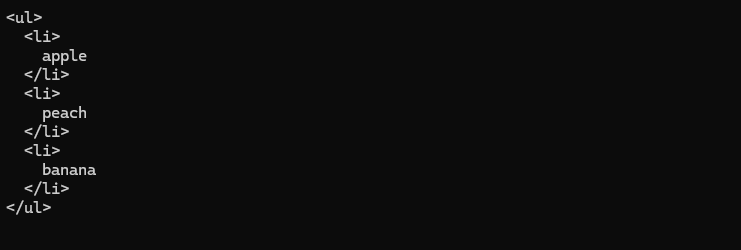
输出如下:
图1 HtmlBuilder输出字符串
Fluent Builder 流式构建器
类似StringBuilder,可以将HtmlBuilder改成Fluent Interface 风格(一种通过返回对象自身或相关对象,让多个方法调用可以连续连接起来的API设计风格),只需改动AddChild方法:
1
2
3
4
5
6
public HtmlBuilder AddChild ( string childName , string childText )
{
var htmlElement = new HtmlElement ( childName , childText );
root . Elements . Add ( htmlElement );
return this ;
}
现在就可以链式调用AddChild了:
1
2
3
var builder = new HtmlBuilder ( "div" );
builder . AddChild ( "p" , "hello" ). AddChild ( "p" , "world" );
Console . WriteLine ( builder . ToString ());
Fluent Builder Inheritance with Recursive Generics 递归泛型实现的流式构建器继承
当Builder存在继承关系时,如何保持Fluent Interface的链式调用类型正确?
假设我们有一个基础Builder:
 1
 2
 3
 4
 5
 6
 7
 8
 9
10
11
12
13
14
15
16
17
18
19
20
21
22
23
24
25
public class Person
{
public string Name { get ; set ; } = string . Empty ;
public string Position { get ; set ; } = string . Empty ;
public override string ToString ()
{
return $"{nameof(Name)}: {Name}, {nameof(Position)}: {Position}" ;
}
}
public class PersonInfoBuilder {
protected Person person = new ();
public PersonInfoBuilder Name ( string name )
{
person . Name = name ;
return this ;
}
public Person Build ()
{
return person ;
}
}
然后派生:
1
2
3
4
5
6
7
8
public class PersonJobBuilder : PersonInfoBuilder
{
public PersonJobBuilder Position ( string position )
{
person . Position = position ;
return this ;
}
}
使用:
1
2
3
var builder = new PersonJobBuilder ();
builder . Name ( "Anthony" ). Position ( "Developer" );
Console . WriteLine ( builder . Build ());
会遇到编译失败'PersonBuilder' does not contain a definition for 'Position'。
因为builder.Name("Anthony")返回的是PersonInfoBuilder。
我们可以用递归泛型(Recursive Generics)解决这个问题,其核心思想是 让基类知道自己的派生类型 。形式为Base<T>,其中T为当前派生类。例如:
1
2
3
public class PersonInfoBuilder < T > where T : PersonInfoBuilder < T > {
}
这叫奇异递归模板模式(Curiously Recurring Template Pattern, CRTP),虽然名字来自C++,但C#也常用。对PeronInfoBuilder和PersonJobBuilder进行改造:
 1
 2
 3
 4
 5
 6
 7
 8
 9
10
11
12
13
14
15
16
17
18
19
20
21
22
23
24
25
26
27
28
29
30
31
32
33
34
35
36
37
38
39
40
41
42
43
44
45
46
public class Person
{
public string Name { get ; set ; } = string . Empty ;
public string Position { get ; set ; } = string . Empty ;
public override string ToString ()
{
return $"{nameof(Name)}: {Name}, {nameof(Position)}: {Position}" ;
}
public class Builder : PersonJobBuilder < Builder >
{
}
public static Builder New => new ();
}
public class PersonInfoBuilder < TSelf > : PersonBuilder
where TSelf : PersonInfoBuilder < TSelf >
{
public TSelf Name ( string name )
{
person . Name = name ;
return ( TSelf ) this ;
}
}
public abstract class PersonBuilder {
protected Person person = new ();
public Person Build ()
{
return person ;
}
}
public class PersonJobBuilder < TSelf > : PersonInfoBuilder < PersonJobBuilder < TSelf >>
where TSelf : PersonJobBuilder < TSelf >
{
public TSelf Position ( string position )
{
person . Position = position ;
return ( TSelf ) this ;
}
}
由于不知道以后谁继承PersonInfoBuilder,但是Name要返回真正的子类,所以给PersonInfoBuilder加了泛型参数TSelf。TSelf就是真正继承的那个类型,如果:
1
class ABC : PersonInfoBuilder < ABC > {}
那么TSelf就是ABC。
使用:
1
2
var person = Person . New . Name ( "Anthony" ). Position ( "Developer" ). Build ();
Console . WriteLine ( person );
Stepwise Builder 分步构建器
分布构建器是Builder一种变体,目的是强制对象必须按照规定的步骤构建,从而避免创建出不完整或非法的对象 。
 1
 2
 3
 4
 5
 6
 7
 8
 9
10
11
12
13
14
15
16
17
18
19
20
21
22
23
24
25
26
27
28
29
30
31
32
33
34
35
36
37
38
39
40
41
42
43
44
45
46
47
48
49
50
51
52
53
54
55
56
57
58
59
60
61
62
63
64
65
66
public enum CarType
{
Sedan ,
Crossover
}
public class Car
{
public CarType Type ;
public int WheelSize ;
public override string ToString ()
{
return $"{nameof(Type)}: {Type}, {nameof(WheelSize)}: {WheelSize}" ;
}
}
public interface ISpecifyCarType
{
ISpecifyWheelSize OfType ( CarType type );
}
public interface ISpecifyWheelSize
{
IBuildCar WithWheels ( int size );
}
public interface IBuildCar
{
public Car Build ();
}
public class CarBuilder
{
private class Impl : ISpecifyCarType , ISpecifyWheelSize , IBuildCar
{
private Car car = new ();
public Car Build ()
{
return car ;
}
public ISpecifyWheelSize OfType ( CarType type )
{
car . Type = type ;
return this ;
}
public IBuildCar WithWheels ( int size )
{
switch ( car . Type )
{
case CarType . Crossover when size < 17 || size > 20 :
case CarType . Sedan when size < 15 || size > 17 :
throw new ArgumentException ( $"Wrong size of wheel for {car.Type}." );
}
car . WheelSize = size ;
return this ;
}
}
public static ISpecifyCarType Create ()
{
return new Impl ();
}
}
使用:
1
2
var car = CarBuilder . Create (). OfType ( CarType . Crossover ). WithWheels ( 18 ). Build ();
Console . WriteLine ( car );
每完成一步,就返回“下一步运行执行的接口” 。和普通Builder相比:
普通 Builder
Stepwise Builder
顺序任意
顺序固定
可以漏字段
必须完成所有步骤
Build() 随时可调用
Build() 只有最后一步才出现
运行时校验
编译期校验
实现简单
实现复杂
Functional Builder 函数式构建器
Builder不再保存对象的状态,而是保存一系列“修改对象的操作(函数)”,最后一次性执行这些操作来构建对象。
举个例子:
 1
 2
 3
 4
 5
 6
 7
 8
 9
10
11
12
13
14
15
16
17
18
19
20
21
22
23
24
25
26
27
28
29
30
31
32
33
34
35
36
public class Person
{
public string Name = string . Empty ;
public string Position = string . Empty ;
public override string ToString ()
{
return $"{nameof(Name)}: {Name}, {nameof(Position)}: {Position}" ;
}
}
public sealed class PersonBuilder
{
private readonly List < Func < Person , Person >> actions = [];
public PersonBuilder Do ( Action < Person > action ) => AddAction ( action );
private PersonBuilder AddAction ( Action < Person > action )
{
actions . Add ( p =>
{
action ( p );
return p ;
});
return this ;
}
public Person Build () => actions . Aggregate ( new Person (), ( person , func ) => func ( person ));
}
public static class PersonBuilderExtensions
{
public static PersonBuilder WorkAs ( this PersonBuilder builder , string position ) => builder . Do ( p => p . Position = position );
public static PersonBuilder Called ( this PersonBuilder builder , string name ) => builder . Do ( p => p . Name = name );
}
调用:
1
var person = new PersonBuilder (). Called ( "Anthony" ). WorkAs ( "Architect" ). Build ();
我们可以让其泛型化,以便可以在不同场景下通用:
 1
 2
 3
 4
 5
 6
 7
 8
 9
10
11
12
13
14
15
16
17
18
19
20
21
22
23
24
25
26
public abstract class FunctionalBuilder < TSubject , TSelf >
where TSelf : FunctionalBuilder < TSubject , TSelf >
where TSubject : new ()
{
private readonly List < Func < TSubject , TSubject >> actions = [];
public TSelf Do ( Action < TSubject > action ) => AddAction ( action );
private TSelf AddAction ( Action < TSubject > action )
{
actions . Add ( p =>
{
action ( p );
return p ;
});
return ( TSelf ) this ;
}
public TSubject Build () => actions . Aggregate ( new TSubject (), ( person , func ) => func ( person ));
}
public sealed class PersonBuilder : FunctionalBuilder < Person , PersonBuilder >
{
public PersonBuilder Called ( string name ) => Do ( p => p . Name = name );
public PersonBuilder WorkAs ( string position ) => Do ( p => p . Position = position );
}
Faceted Builder 分面构建器
Faceted Builder主要解决的问题是:
当一个对象需要构建的信息来自多个不同维度(Facet)时,将不同维度的构建逻辑拆分成多个专门的Builder,避免一个Builder变得臃肿。
假设创建一个员工:
 1
 2
 3
 4
 5
 6
 7
 8
 9
10
11
12
13
14
15
16
17
public class Person
{
public string Name ;
public string Street ;
public string City ;
public string Company ;
public string Position ;
public string Email ;
public string Phone ;
public override string ToString ()
{
return $"{nameof(Name)}: {Name}, {nameof(Company)}: {Company}" ;
}
}
如果使用普通Builder:
1
2
3
4
5
6
7
8
PersonBuilder
. WithName ( "Anthony" )
. WithAddress ( "Singapore" )
. WithCompany ( "OpenAI" )
. WithPosition ( "Engineer" )
. WithEmail ( "xxx" )
. WithPhone ( "xxx" )
. Build ();
方法越来越多,职责越来越乱,不容易维护。这违反了单一职责原则。
Faceted Builder将Builder拆分成多个面,比如PersonInfo、AddressFacet以及JobFacet,每个Builder负责一个维度。
 1
 2
 3
 4
 5
 6
 7
 8
 9
10
11
12
13
14
15
16
17
18
19
20
21
22
23
24
25
26
27
28
29
30
31
32
33
34
35
36
37
38
39
40
41
42
43
44
45
46
47
48
49
50
51
public class PersonBuilder
{
protected Person person = new ();
public Person Build ()
{
return person ;
}
public PersonInfoBulder Info => new PersonInfoBulder ( person );
public PersonJobBuilder Job => new PersonJobBuilder ( person );
}
public class PersonInfoBulder : PersonBuilder
{
public PersonInfoBulder ( Person person )
{
this . person = person ;
}
public PersonInfoBulder Name ( string name )
{
person . Name = name ;
return this ;
}
}
public class PersonJobBuilder : PersonBuilder
{
public PersonJobBuilder ( Person person )
{
this . person = person ;
}
public PersonJobBuilder WorksAt ( string company )
{
person . Company = company ;
return this ;
}
public PersonJobBuilder As ( string position )
{
person . Position = position ;
return this ;
}
}
使用:
1
2
var person = new PersonBuilder (). Info . Name ( "Anthony" ). Job . WorksAt ( "BBC" ). As ( "Developer" ). Build ();
Console . WriteLine ( person );
Summary 总结
A builder is a separate component for building an object
Can either give builder a constructor or return it via a static function
To make builder fluent, return this
Different facets of an object can be built with different builders working in tandem via a base class
Factories 工厂
包含了两种设计模式:工厂方法(Factory Method)和抽象工厂(Abstract Factory)。
Motivation
Object creation logic becomes too convoluted
Constructor it not descriptive
Name mendated by name of containing type
Cannot overload with same sets of arguments with different names
Can turn into ‘optional parameter hell’
Object creation (non-piecewise, unlike Builder) can be outsourced to
A separate function (Factory Method)
That may exist in a separate class (Factory)
Can create hierarchy of factories with Abstract Factory
工厂就是一个简单组件,其职责就是创建完整对象。
Point Example 示例
工厂存在的原因之一就是构造函数有时候并不是那么好用。假设我们有一个Point类:
 1
 2
 3
 4
 5
 6
 7
 8
 9
10
11
public class Point
{
private double x ;
private double y ;
public Point ( double x , double y )
{
this . x = x ;
this . y = y ;
}
}
现在想让其支持极坐标系,我们需要改造一下:
 1
 2
 3
 4
 5
 6
 7
 8
 9
10
11
12
13
14
15
16
17
18
19
20
21
22
23
24
25
26
27
28
public enum CoordinateSystem
{
Cartesian ,
Polar
}
public class Point
{
private double x ;
private double y ;
public Point ( double a , double b , CoordinateSystem coordinateSystem = CoordinateSystem . Cartesian )
{
switch ( coordinateSystem )
{
case CoordinateSystem . Cartesian :
x = a ;
y = b ;
break ;
case CoordinateSystem . Polar :
x = a * Math . Cos ( b );
y = a * Math . Sin ( b );
break ;
default :
throw new ArgumentOutOfRangeException ( nameof ( coordinateSystem ), coordinateSystem , null );
}
}
}
构造函数的参数a和b没有任何命名价值,同时为了让两种坐标系区分,不得不加coordinateSystem参数。
Factory Method 工厂方法
工厂方法可以改善这种情况:
 1
 2
 3
 4
 5
 6
 7
 8
 9
10
11
12
13
14
15
16
17
18
19
20
21
22
23
24
25
26
public class Point
{
private double x ;
private double y ;
public override string ToString ()
{
return $"({x}, {y})" ;
}
public static Point NewPolarPoint ( double rho , double theta )
{
return new Point ( Math . Cos ( theta ) * rho , Math . Sin ( theta ) * rho );
}
public static Point NewCartesianPoint ( double x , double y )
{
return new Point ( x , y );
}
private Point ( double x , double y )
{
this . x = x ;
this . y = y ;
}
}
Asynchronous Factory Method 异步工厂方法
异步调用可以在方法中发生,但不能在构造函数中发生,这就成了一个问题,有时我们想要进行异步初始化。如何实现这点?可以通过工厂方法限制用户用异步方式初始化。
 1
 2
 3
 4
 5
 6
 7
 8
 9
10
11
12
13
14
15
16
17
18
19
public class Foo
{
private Foo ()
{
}
private async Task < Foo > InitAsync ()
{
await Task . Delay ( 500 );
return this ;
}
public static Task < Foo > CreateAsync ()
{
var result = new Foo ();
return result . InitAsync ();
}
}
Factory 工厂
我们也可以创建一个工厂类用于创建对象。
 1
 2
 3
 4
 5
 6
 7
 8
 9
10
11
12
13
14
15
16
17
18
19
20
21
22
23
24
25
26
27
28
29
30
public static class PointFactory
{
public static Point NewPolarPoint ( double rho , double theta )
{
return new Point ( Math . Cos ( theta ) * rho , Math . Sin ( theta ) * rho );
}
public static Point NewCartesianPoint ( double x , double y )
{
return new Point ( x , y );
}
}
public class Point
{
private double x ;
private double y ;
public override string ToString ()
{
return $"({x}, {y})" ;
}
public Point ( double x , double y )
{
this . x = x ;
this . y = y ;
}
}
为了让PointFactory能够使用Point的构造函数,将其设定为了public,后面会解决这个问题。
Object Tracking and Bulk Replacement 对象跟踪和批量替换
我们还可以对工厂进行扩展,使工厂不仅负责创建对象,还负责管理已经创建的对象生命周期,并支持批量更新/替换对象内部引用。
一般工厂:
 1
 2
 3
 4
 5
 6
 7
 8
 9
10
11
12
13
14
15
16
17
18
19
20
21
22
23
24
25
26
27
28
public interface ITheme
{
public string TextColor => "black" ;
public string BackgroundColor => "white" ;
}
public class DarkTheme : ITheme
{
public string TextColor => "white" ;
public string BackgroundColor => "dark gray" ;
}
public class LightTheme : ITheme
{
public string TextColor => "black" ;
public string BackgroundColor => "white" ;
}
public class ThemeFactory
{
public ITheme CreateTheme ( bool isDark )
{
return isDark
? new DarkTheme ()
: new LightTheme ();
}
}
ThemeFactory创建完对象后不知道自己创建过哪些对象,例如:
1
2
3
4
var factory = new ThemeFactory ();
var theme1 = factory . CreateTheme ( true );
var theme2 = factory . CreateTheme ( false );
var theme3 = factory . CreateTheme ( false );
之后如果想factory.ChangeAllThemesToDark()是不可能实现的,因为工厂没有保存对象引用。我们可以在工厂类中保存对象引用用于追踪创建了哪些对象:
 1
 2
 3
 4
 5
 6
 7
 8
 9
10
11
12
13
14
15
16
17
18
19
20
21
22
23
24
25
26
public class TrackingThemeFactory
{
private readonly List < WeakReference < ITheme >> themes = [];
public ITheme CreateTheme ( bool isDark )
{
ITheme theme = isDark ? new DarkTheme () : new LightTheme ();
themes . Add ( new WeakReference < ITheme >( theme ));
return theme ;
}
public string Info
{
get
{
var sb = new StringBuilder ();
foreach ( var theme in themes )
{
if (! theme . TryGetTarget ( out var target )) continue ;
var isDark = target is DarkTheme ;
sb . Append ( isDark ? "Dark" : "Light" ). AppendLine ( " theme" );
}
return sb . ToString ();
}
}
}
实现创建出来的Theme可以被统一替换:
 1
 2
 3
 4
 5
 6
 7
 8
 9
10
11
12
13
14
15
16
17
18
19
20
21
22
23
24
25
26
27
28
29
30
31
32
33
34
public class Ref < T > where T : class
{
public T Value ;
public Ref ( T value )
{
Value = value ;
}
}
public class ReplaceableThemeFactory
{
private readonly List < WeakReference < Ref < ITheme >>> themes = [];
private ITheme CreateThemeImpl ( bool dark )
{
return dark ? new DarkTheme () : new LightTheme ();
}
public Ref < ITheme > CreateTheme ( bool isDark )
{
var r = new Ref < ITheme >( CreateThemeImpl ( isDark ));
themes . Add ( new WeakReference < Ref < ITheme >>( r ));
return r ;
}
public void ReplaceTheme ( bool dark )
{
foreach ( var theme in themes )
{
if (! theme . TryGetTarget ( out var target )) continue ;
target . Value = CreateThemeImpl ( dark );
}
}
}
Inner Factory 内部工厂
为了解决Factory 工厂 中Point构造函数为public的问题,我们可以将工厂类作为Point的内部类:
 1
 2
 3
 4
 5
 6
 7
 8
 9
10
11
12
13
14
15
16
17
18
19
20
21
22
23
24
25
26
27
28
29
30
public class Point
{
private double x ;
private double y ;
public override string ToString ()
{
return $"({x}, {y})" ;
}
private Point ( double x , double y )
{
this . x = x ;
this . y = y ;
}
public static class Factory
{
public static Point NewPolarPoint ( double rho , double theta )
{
return new Point ( Math . Cos ( theta ) * rho , Math . Sin ( theta ) * rho );
}
public static Point NewCartesianPoint ( double x , double y )
{
return new Point ( x , y );
}
}
}
Abstract Factory 抽象工厂
抽象工厂提供抽象对象,而不是具体对象。假设我们有一个支持Coffee和Tea的热饮机,最简单写法:
 1
 2
 3
 4
 5
 6
 7
 8
 9
10
11
12
13
14
15
16
public class HotDrinkMachine
{
public IHotDrink MakeDrink ( string type , int amount )
{
if ( type == "Tea" )
{
return new Tea ();
}
else if ( type == "Coffee" )
{
return new Coffee ();
}
throw new Exception ();
}
}
看起来很简单。但是增加Juice、MilkTea、HotChocolate怎么办?继续修改:
1
2
3
4
5
6
7
8
9
if ( type == "Tea" )
{
}
else if ( type == "Coffee" )
{
}
else if ( type == "HotChocolate" )
{
}
违反了开闭原则 ,一旦要增加新饮料,就需要修改HotDrinkMachine类的MakeDrink方法。可通常抽离出接口解决这个问题:
 1
 2
 3
 4
 5
 6
 7
 8
 9
10
11
12
13
14
15
16
17
18
19
20
21
22
23
24
25
26
27
28
29
30
31
32
33
34
35
36
37
38
39
40
41
42
43
44
45
46
47
48
49
50
51
52
53
54
55
56
57
58
59
60
61
62
63
64
65
66
67
68
69
70
public interface IHotDrink
{
void Consume ();
}
internal class Tea : IHotDrink
{
public void Consume ()
{
Console . WriteLine ( "This tea is nice but I'd prefer it with milk." );
}
}
internal class Coffee : IHotDrink
{
public void Consume ()
{
Console . WriteLine ( "This coffee is sensational!" );
}
}
public interface IHotDrinkFactory
{
IHotDrink Prepare ( int amount );
}
internal class TeaFactory : IHotDrinkFactory
{
public IHotDrink Prepare ( int amount )
{
Console . WriteLine ( $"Put in a tea bag, boil water, pour {amount} ml, add lemon, enjoy!" );
return new Tea ();
}
}
internal class CoffeeFactory : IHotDrinkFactory
{
public IHotDrink Prepare ( int amount )
{
Console . WriteLine ( $"Grind some beans, boil water, pour {amount}ml, add cream and sugar" );
return new Coffee ();
}
}
public class HotDrinkMachine
{
public enum AvailableDrink
{
Coffee ,
Tea ,
}
private Dictionary < AvailableDrink , IHotDrinkFactory > factories = [];
public HotDrinkMachine ()
{
foreach ( AvailableDrink drink in Enum . GetValues ( typeof ( AvailableDrink )))
{
var className = "Factories." + Enum . GetName ( typeof ( AvailableDrink ), drink ) + "Factory" ;
var factory = ( IHotDrinkFactory ) Activator . CreateInstance ( Type . GetType ( className ));
factories . Add ( drink , factory );
}
}
public IHotDrink MakeDrink ( AvailableDrink drink , int amount )
{
return factories [ drink ]. Prepare ( amount );
}
}
Abstract Factory通过创建“产品族”的抽象层,把具体实现隔离出去,使系统能够通过增加新的 Factory 来扩展,而无需修改客户端代码。
Abstract Factory and OCP 抽象工厂和开闭原则
HotDrinkMachine中的AvailableDrink也违反了开闭原则,可以优化一下:
 1
 2
 3
 4
 5
 6
 7
 8
 9
10
11
12
13
14
15
16
17
18
19
20
21
22
23
24
25
26
27
28
29
30
31
32
33
34
35
36
37
38
39
40
41
42
43
44
45
46
public class HotDrinkMachine
{
private List < Tuple < string , IHotDrinkFactory >> _drinkFactories = [];
public HotDrinkMachine ()
{
foreach ( var t in typeof ( HotDrinkMachine ). Assembly . GetTypes ())
{
if ( typeof ( IHotDrinkFactory ). IsAssignableFrom ( t ) && ! t . IsInterface )
{
_drinkFactories . Add ( Tuple . Create ( t . Name . Replace ( "Factory" , string . Empty ),
Activator . CreateInstance ( t ) as IHotDrinkFactory
));
}
}
}
public IHotDrink MakeDrink ()
{
Console . WriteLine ( $"Available drinks:" );
for ( int index = 0 ; index < _drinkFactories . Count ; index ++)
{
var tuple = _drinkFactories [ index ];
Console . WriteLine ( $"{index}: {tuple.Item1}" );
}
while ( true )
{
string s ;
if (( s = Console . ReadLine ()) != null
&& int . TryParse ( s , out int i )
&& i >= 0 && i < _drinkFactories . Count )
{
Console . WriteLine ( $"Specify amount: " );
s = Console . ReadLine ();
if ( s != null
&& int . TryParse ( s , out int amount )
&& amount > 0 )
{
return _drinkFactories [ i ]. Item2 . Prepare ( amount );
}
}
Console . WriteLine ( "Incorrect input, try again!" );
}
}
}
通过反射(Reflection)自动发现Factory,实现真正的开闭原则。
Summary 总结
A factory method is a static method that creates objects
A factory can take care of object creation
A factory can be external or reside inside the object as an inner class
Hierarchies of factories can be used to create releated objects
Prototype 原型
When it’s easier to copy an existing object to fully initialize a new one. A partically or fully initialized object that you copy (clone) and make use of.
Motivation
Complicated objects (e.g., cars)
They reinterate existing designs
An existing (partially or fulll constructed) design is a Prototype
We make a copy (clone) the prototype and customize it
Requires ‘deep copy’ support
We make the cloning convenient (e.g., via a Factory)
 AndyFree96 收录于 在线课程
 支付宝
支付宝
 微信
微信