在工业软件、设备控制系统、网络诊断工具开发中,经常需要获取当前计算机的网络状态,例如:
当前有哪些网卡?
网卡是否连接?
IP地址是多少?
MAC地址是多少?
网络连接速度是多少?
DNS、网关、DHCP信息是什么?
.NET提供了一个非常方便的命名空间System.Net.NetworkInformation,其中核心类:
类
作用
NetworkInterface
获取网卡信息
IPInterfaceProperties
获取 IP 配置
IPAddressInformation
获取 IP 地址状态
PhysicalAddress
获取 MAC 地址
NetworkChange
监听网络变化
本文将系统介绍如何使用这些API构建一个网络信息采集工具。
获取所有网络接口
最基础的方式:
1
2
3
4
5
var interfaces = NetworkInterface . GetAllNetworkInterfaces ();
foreach ( var ni in interfaces )
{
Console . WriteLine ( ni . Name );
}
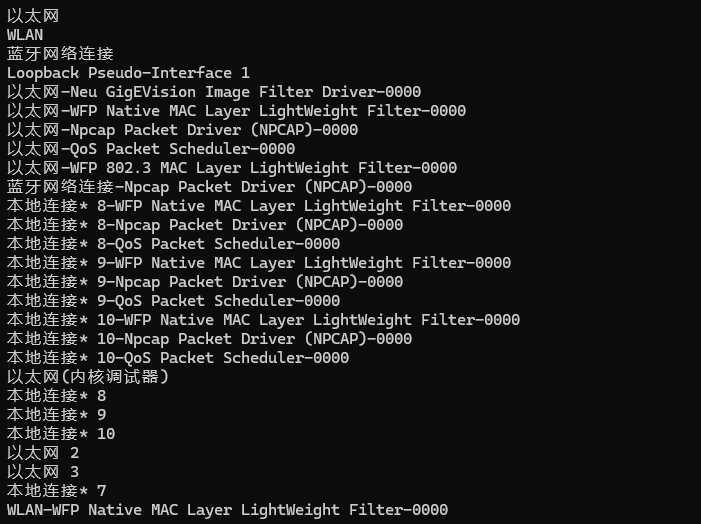
输出如下:
图1 系统中所有网络适配器
每一个NetworkInterface对应系统中的一个网络适配器。
NetworkInterface核心属性
1
2
3
4
5
6
7
8
9
var interfaces = NetworkInterface . GetAllNetworkInterfaces ();
foreach ( var ni in interfaces )
{
Console . WriteLine ( $"名称: {ni.Name}" );
Console . WriteLine ( $"描述: {ni.Description}" );
Console . WriteLine ( $"类型: {ni.NetworkInterfaceType}" );
Console . WriteLine ( $"状态: {ni.OperationalStatus}" );
Console . WriteLine ( string . Concat ( Enumerable . Repeat ( "#" , 80 )));
}
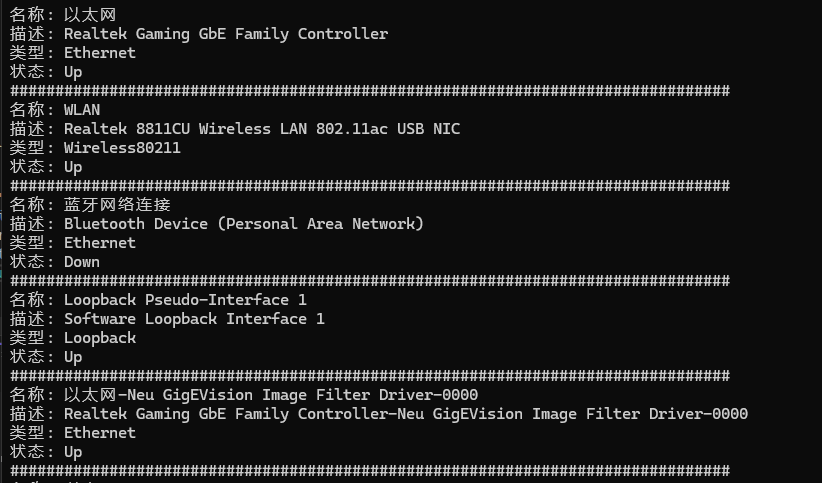
图2 适配器详细信息
NetworkInterfaceType表示网卡类型,常见有:
类型
说明
Ethernet
有线网卡
Wireless80211
WiFi
Loopback
本地回环
Tunnel
VPN 隧道
工业设备通常重点关注Ethernet,PLC、工业相机等通常都是通过以太网连接,可通过该属性进行筛选。
 1
 2
 3
 4
 5
 6
 7
 8
 9
10
var interfaces = NetworkInterface . GetAllNetworkInterfaces ();
foreach ( var ni in interfaces )
{
if ( ni . NetworkInterfaceType != NetworkInterfaceType . Ethernet ) continue ;
Console . WriteLine ( $"名称: {ni.Name}" );
Console . WriteLine ( $"描述: {ni.Description}" );
Console . WriteLine ( $"类型: {ni.NetworkInterfaceType}" );
Console . WriteLine ( $"状态: {ni.OperationalStatus}" );
Console . WriteLine ( string . Concat ( Enumerable . Repeat ( "#" , 80 )));
}
判断网卡是否可用
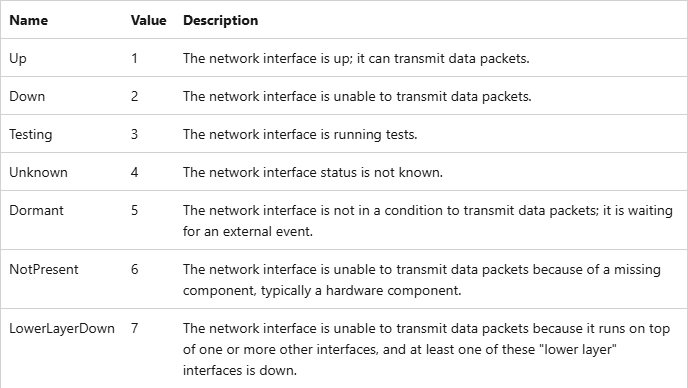
我们可通过OperationalStatus 判断网卡是否可用。
图3 OperationalStatus的不同枚举值
 1
 2
 3
 4
 5
 6
 7
 8
 9
10
11
var interfaces = NetworkInterface . GetAllNetworkInterfaces ();
var activeInterfaces = interfaces . Where ( x => x . OperationalStatus == OperationalStatus . Up );
foreach ( var ni in activeInterfaces )
{
if ( ni . NetworkInterfaceType != NetworkInterfaceType . Ethernet ) continue ;
Console . WriteLine ( $"名称: {ni.Name}" );
Console . WriteLine ( $"描述: {ni.Description}" );
Console . WriteLine ( $"类型: {ni.NetworkInterfaceType}" );
Console . WriteLine ( $"状态: {ni.OperationalStatus}" );
Console . WriteLine ( string . Concat ( Enumerable . Repeat ( "#" , 80 )));
}
获取MAC地址
NetworkInterface有一个GetPhysicalAddress方法可用来获取MAC地址。
 1
 2
 3
 4
 5
 6
 7
 8
 9
10
var interfaces = NetworkInterface . GetAllNetworkInterfaces ();
var activeInterfaces = interfaces . Where ( x => x . OperationalStatus == OperationalStatus . Up );
foreach ( var ni in activeInterfaces )
{
if ( ni . NetworkInterfaceType != NetworkInterfaceType . Ethernet ) continue ;
var mac = ni . GetPhysicalAddress ();
if ( mac == null ) continue ;
string macAddress = string . Join ( ":" , mac . GetAddressBytes (). Select ( x => x . ToString ( "X2" )));
Console . WriteLine ( macAddress );
}
获取IP地址
通过:
1
var properties = ni . GetIPProperties ();
其中:
1
properties . UnicastAddresses
表示本机IP。通常只需要IPv4:
 1
 2
 3
 4
 5
 6
 7
 8
 9
10
11
var interfaces = NetworkInterface . GetAllNetworkInterfaces ();
var activeInterfaces = interfaces . Where ( x => x . OperationalStatus == OperationalStatus . Up );
foreach ( var ni in activeInterfaces )
{
var properties = ni . GetIPProperties ();
foreach ( var ip in properties . UnicastAddresses )
{
if ( ip . Address . AddressFamily != System . Net . Sockets . AddressFamily . InterNetwork ) continue ;
Console . WriteLine ( ip . Address );
}
}
获取子网掩码
通过UnicastIPAddressInformation类的IPv4Mask属性可获取到子网掩码。
 1
 2
 3
 4
 5
 6
 7
 8
 9
10
11
var interfaces = NetworkInterface . GetAllNetworkInterfaces ();
var activeInterfaces = interfaces . Where ( x => x . OperationalStatus == OperationalStatus . Up );
foreach ( var ni in activeInterfaces )
{
var properties = ni . GetIPProperties ();
foreach ( var ip in properties . UnicastAddresses )
{
if ( ip . Address . AddressFamily != System . Net . Sockets . AddressFamily . InterNetwork ) continue ;
Console . WriteLine ( $"IP: {ip.Address} Mask: {ip.IPv4Mask}" );
}
}
获取默认网关
通过IPInterfaceProperties类的GatewayAddresses属性可获取到网关信息(GatewayIPAddressInformationCollection类)。
 1
 2
 3
 4
 5
 6
 7
 8
 9
10
11
12
13
14
15
16
17
18
19
var interfaces = NetworkInterface . GetAllNetworkInterfaces ();
var activeInterfaces = interfaces . Where ( x => x . OperationalStatus == OperationalStatus . Up );
foreach ( var ni in activeInterfaces )
{
Console . WriteLine ( $"Speed: {ni.Speed} Name: {ni.Name}" );
var properties = ni . GetIPProperties ();
foreach ( var ip in properties . UnicastAddresses )
{
if ( ip . Address . AddressFamily != System . Net . Sockets . AddressFamily . InterNetwork ) continue ;
Console . WriteLine ( $"IP: {ip.Address} Mask: {ip.IPv4Mask}" );
}
var gateways = properties . GatewayAddresses ;
foreach ( var gateway in gateways )
{
Console . WriteLine ( $"Gateway: {gateway.Address}" );
}
}
获取DNS信息
1
2
3
4
5
6
var dnsAddresses = properties . DnsAddresses ;
foreach ( var dns in dnsAddresses )
{
Console . WriteLine ( $"DNS: {dns}" );
}
获取网络速度
NetworkInterface.Speed表示网络接口的速度,单位是比特/秒。
1
double Mbps = ni . Speed / 1000_000.0 ;
获取网络统计信息
1
2
3
var stats = ni . GetIPv4Statistics ();
Console . WriteLine ( $"Sent: {stats.BytesSent} Received: {stats.BytesReceived}" );
网络配置文件(Network Profile)
Windows会根据当前网络环境,将网络划分为3种Profile:
Profile
含义
默认安全级别
DomainAuthenticated
域网络
最低限制
Private
家庭/可信网络
中等
Public
公共网络
最高限制
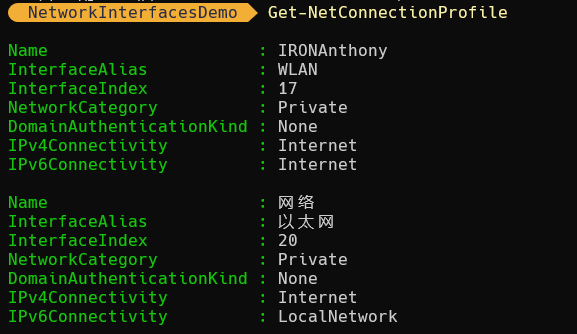
Windows防火墙、文件共享、网络发现等功能会根据Profile调整。System.Net.NetworkInformation无法直接获取Profile类型,需要调用Windows API。我们可以使用PowerShell获取Network Profile,执行Get-NetConnectionProfile即可:
图4 PowerShell获取Network Profile信息
关键字段:
字段
含义
InterfaceAlias
网卡名称
NetworkCategory
Profile
IPv4Connectivity
IPv4状态
IPv6Connectivity
IPv6状态
我们可通过C#调用PowerShell获取Profile,NuGet添加Microsoft.PowerShell.SDK,引入System.Management.Automation。
 1
 2
 3
 4
 5
 6
 7
 8
 9
10
11
12
13
14
15
16
17
18
19
20
21
22
23
24
25
26
27
28
29
30
// Query network profiles (Domain/Private/Public) for all connected interfaces via PowerShell.
// Keyed by InterfaceAlias which matches networkInterface.Name in the .NET API.
var profileByAlias = new Dictionary < string , NetworkProfile >( StringComparer . OrdinalIgnoreCase );
try
{
using var ps = SMA . PowerShell . Create ();
ps . AddScript ( "Get-NetConnectionProfile | Select-Object InterfaceAlias, NetworkCategory" );
foreach ( var result in ps . Invoke ())
{
var alias = result . Properties [ "InterfaceAlias" ]?. Value ?. ToString ();
var category = result . Properties [ "NetworkCategory" ]?. Value ?. ToString ();
if ( string . IsNullOrEmpty ( alias ))
continue ;
profileByAlias [ alias ] = category switch
{
"DomainAuthenticated" => NetworkProfile . Domain ,
"Private" => NetworkProfile . Private ,
"Public" => NetworkProfile . Public ,
_ => NetworkProfile . NotConfigured
};
}
}
catch ( Exception ex )
{
Log . Warn ( "Failed to query network connection profiles via Get-NetConnectionProfile." , ex );
}
以上代码来自NETworkManager 。
监听网络状态变化
.NET提供NetworkChange事件:
1
NetworkChange . NetworkAddressChanged += OnNetworkChanged ;
实现:
1
2
3
4
private static void OnNetworkChanged ( object? sender , EventArgs e )
{
Console . WriteLine ( $"网络发生变化" );
}
此时,如果我们断网,会立即输出“网络发生变化”。
封装网络信息模型
实际项目建议封装:
 1
 2
 3
 4
 5
 6
 7
 8
 9
10
public class NetworkInterfaceInfo
{
public string Name { get ; set ; } = string . Empty ;
public string Description { get ; set ; } = string . Empty ;
public string MacAddress { get ; set ; } = string . Empty ;
public List < string > IpAddresses { get ; set ; } = [];
public string Gateway { get ; set ; } = string . Empty ;
public long Speed { get ; set ; } = 0 ;
public OperationalStatus Status { get ; set ; }
}
实现网络信息采集器
 1
 2
 3
 4
 5
 6
 7
 8
 9
10
11
12
13
14
15
16
17
18
19
20
21
22
23
24
25
26
27
28
29
30
31
32
33
34
35
36
37
38
39
40
41
42
43
44
45
46
47
48
49
50
51
52
public class NetworkInterfaceInfo
{
public string Name { get ; set ; } = string . Empty ;
public string Description { get ; set ; } = string . Empty ;
public string MacAddress { get ; set ; } = string . Empty ;
public List < string > IpAddresses { get ; set ; } = [];
public string Gateway { get ; set ; } = string . Empty ;
public long Speed { get ; set ; } = 0 ;
public OperationalStatus Status { get ; set ; }
public override string ToString ()
{
var ips = string . Join ( ", " , IpAddresses );
return $@"
Name: {Name}
Description: {Description}
MAC: {MacAddress}
Gateway: {Gateway}
Speed: {Speed}
Status: {Status}
IP: {ips}
" ;
}
}
public static class NetworkInterfaceHelper
{
public static List < NetworkInterfaceInfo > GetNetworkInterfaces ()
{
var networkInterfaces = new List < NetworkInterfaceInfo >();
foreach ( var ni in NetworkInterface . GetAllNetworkInterfaces ())
{
if ( ni . OperationalStatus != OperationalStatus . Up ) continue ;
var properties = ni . GetIPProperties ();
var networkInfo = new NetworkInterfaceInfo ()
{
Name = ni . Name ,
Description = ni . Description ,
Speed = ni . Speed ,
MacAddress = ni . GetPhysicalAddress (). ToString (),
};
networkInfo . IpAddresses = [.. properties . UnicastAddresses . Select ( x => x . Address . ToString ())];
networkInfo . Gateway = properties . GatewayAddresses . FirstOrDefault ()?. Address ?. ToString () ?? "" ;
networkInterfaces . Add ( networkInfo );
}
return networkInterfaces ;
}
}
调用:
1
2
3
4
5
var networkInterfaces = NetworkInterfaceHelper . GetNetworkInterfaces ();
foreach ( var networkInterface in networkInterfaces )
{
Console . WriteLine ( networkInterface );
}
参考
System.Net.NetworkInformation Namespace
 AndyFree96 收录于 工业自动化
 支付宝
支付宝
 微信
微信