在现代工业化设备中,串口通信大量存在。例如:PLC通信、伺服驱动器、扫码枪、光源控制器、温控器等等。虽然现在Ethernet、TCP/IP越来越普及,但串口因为成本低、稳定、硬件简单等原因,仍然是工业现场最常见的通信方式之一。很多开发者初次接触串口通信,会觉得非常简单:
1
2
3
4
5
6
7
8
SerialPort serialPort = new ();
serialPort . PortName = "COM3" ;
serialPort . BaudRate = 9600 ;
serialPort . Open ();
serialPort . Write ( "Hello" );
但是在实际工业项目中,很快会遇到为什么收到的数据经常不完整?为什么一次Read读不到完整协议?如何设计一个可扩展通信系统?真正困难的不是打开串口,而是:
如何设计一个可靠的串口通信系统。
串口通信是什么?
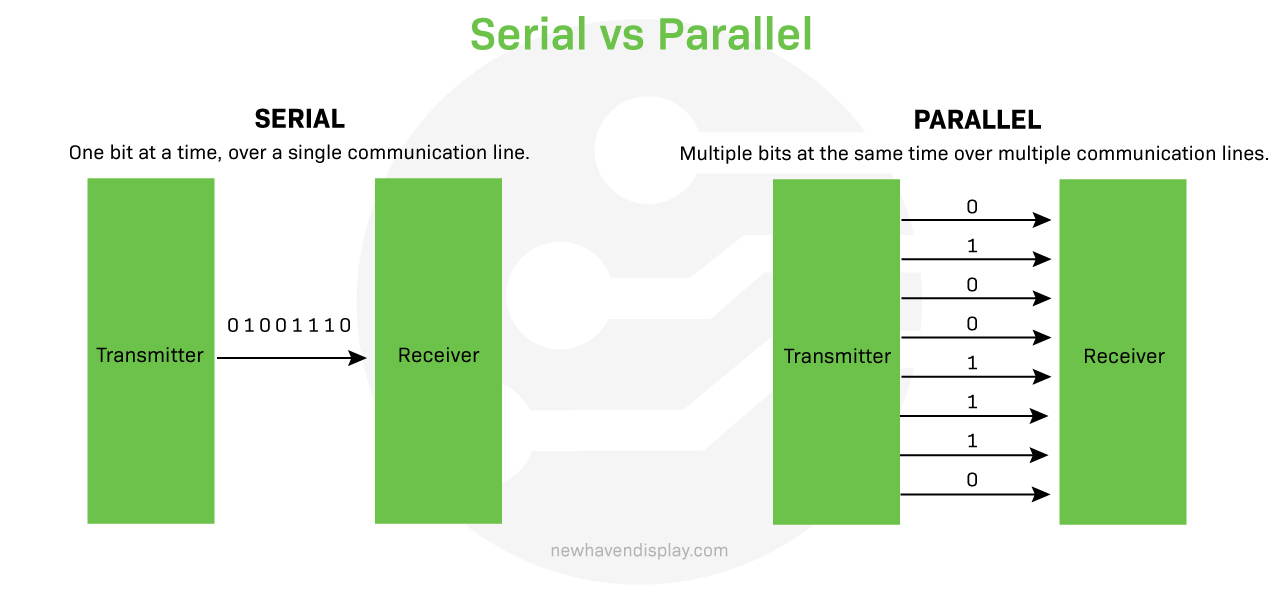
串口(Serial Port)是一种按照一个bit一个bit顺序传输数据 的通信方式。例如:01010101,不是一次性发送8个bit,而是bit0 -> bit1 -> … -> bit7。
与并口(Parallel Port)相比:
串口
并口
传输方式
逐位
多位同时
线路
少
多
距离
远
短
成本
低
高
图1 串口与并口
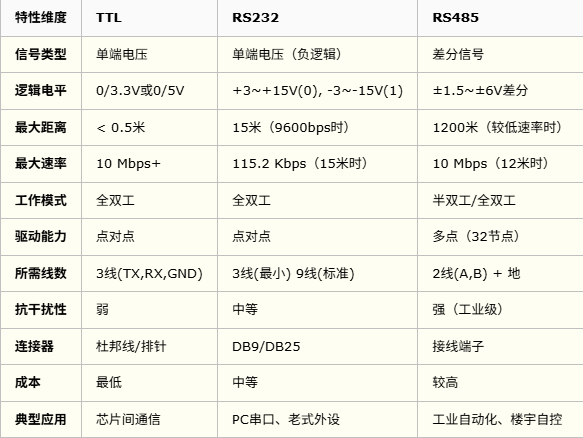
RS232/RS485/TTL有什么区别?
图2 RS232/RS485/TTL对比
C#中SerialPort的基本使用
.NET提供System.IO.Ports.SerialPort ,可如下创建一个实例:
1
2
3
4
5
6
7
8
var port = new SerialPort
{
PortName = "COM3" ,
BaudRate = 9600 ,
DataBits = 8 ,
StopBits = StopBits . One ,
Parity = Parity . None
};
对应串口参数:
参数
含义
BaudRate
波特率
DataBits
数据位
StopBits
停止位
Parity
校验
为什么SerialPort.ReadLine很危险?
我们可能会这样写:
1
string data = serialPort . ReadLine ();
问题是串口没有天然消息边界 。例如:设备发送AA 01 02 03 BB,SerialPort第一次可能收到AA 01,第二次收到02 03 BB。串口只保证字节顺序,不保证一次读取就是一次发送。
串口通信核心问题:如何解决数据边界?
这是串口开发最重要的问题。
方案1:固定长度协议
假设协议结构如下,总共16字节。
1
2
3
+------+-----+-------+-----+
| HEAD | ADR | DATA  | CRC |
+------+-----+-------+-----+
那么只要接收到了16字节去解析处理即可:
1
2
3
4
while ( buffer . Count >= 16 )
{
Parse ( buffer . Take ( 16 ));
}
方案2:特殊字符分隔
例如$TEMP,25.6#,协议以$开始,以#结束。那么只要接收到了#就可以对该包进行解析:
1
2
3
if ( byte == '#' ) {
Parse ( packet );
}
方案3:长度字段
协议中可增加一个长度字段:
1
2
3
+------+-----+-------+-----+
| HEAD | LEN | DATA  | CRC |
+------+-----+-------+-----+
解析:
1
2
3
if ( buffer . Length >= len ) {
Parse ();
}
正确的串口接收架构
不要DataRecevied->直接解析。推荐:
flowchart TD
    A[SerialPort] --> B[Receive Thread]
    B --> C[Byte Buffer]
    C --> D[Protocol Parser]
    D --> E[业务逻辑]
flowchart TD
    A[SerialPort] --> B[Receive Thread]
    B --> C[Byte Buffer]
    C --> D[Protocol Parser]
    D --> E[业务逻辑]
flowchart TD
    A[SerialPort] --> B[Receive Thread]
    B --> C[Byte Buffer]
    C --> D[Protocol Parser]
    D --> E[业务逻辑]
1
2
3
4
5
flowchart TD
    A[SerialPort] --> B[Receive Thread]
    B --> C[Byte Buffer]
    C --> D[Protocol Parser]
    D --> E[业务逻辑]
分为通信层、协议层、业务层。
实现一个工业级串口通信框架
创建项目:
1
2
3
4
5
dotnet new classlib -n SimpleSerialCommunication.Core
dotnet new console -n SimpleSerialCommunication.Sample --use-program-main
dotnet new sln -n SimpleSerialCommunication
dotnet sln add ./SimpleSerialCommunication.Core/SimpleSerialCommunication.Core.csproj
dotnet sln add ./SimpleSerialCommunication.Sample/SimpleSerialCommunication.Sample.csproj
SimpleSerialCommunication.Core需要引用System.IO.Ports。如果.NET Core/.NET 5+:
1
dotnet add package System.IO.Ports
SimpleSerialCommunication.Core完整代码如下:
Packet.cs CRC16.cs PacketBuilder.cs PacketParser.cs SerialBuffer.cs SerialClient.cs SerialOptions.cs
 1
 2
 3
 4
 5
 6
 7
 8
 9
10
11
12
13
14
15
16
17
18
19
20
21
using System ;
using System.Collections.Generic ;
using System.Linq ;
using System.Text ;
using System.Threading.Tasks ;
namespace SimpleSerialCommunication.Core ;
public class Packet
{
public byte Command { get ; init ; }
public byte [] Data { get ; init ; } = [];
public override string ToString ()
{
return $"CMD={Command:X2}, DATA={BitConverter.ToString(Data)}" ;
}
}
 1
 2
 3
 4
 5
 6
 7
 8
 9
10
11
12
13
14
15
16
17
18
19
20
21
22
23
24
25
26
27
28
29
30
31
32
33
34
using System ;
using System.Collections.Generic ;
using System.Linq ;
using System.Text ;
using System.Threading.Tasks ;
namespace SimpleSerialCommunication.Core ;
// CRC16-MODBUS
public static class CRC16
{
public static ushort Calculate ( byte [] data )
{
ushort crc = 0xFFFF ;
foreach ( byte b in data )
{
crc ^= b ;
for ( int i = 0 ; i < 8 ; i ++)
{
if (( crc & 1 ) == 1 )
{
crc >>= 1 ;
crc ^= 0xA001 ;
}
else
{
crc >>= 1 ;
}
}
}
return crc ;
}
}
 1
 2
 3
 4
 5
 6
 7
 8
 9
10
11
12
13
14
15
16
17
18
19
20
21
22
23
24
25
26
27
28
29
30
31
32
33
34
35
36
37
38
39
40
41
42
43
44
45
46
47
48
49
50
51
52
53
54
55
56
57
58
59
60
61
62
63
64
65
66
67
68
69
using System ;
using System.Collections.Generic ;
using System.Linq ;
using System.Text ;
using System.Threading.Tasks ;
using static System . Runtime . InteropServices . JavaScript . JSType ;
namespace SimpleSerialCommunication.Core ;
public class PacketBuilder
{
private const byte HEADER = 0xAA ;
private byte _command ;
private byte [] _data = [];
public static PacketBuilder Create ()
{
return new ();
}
public PacketBuilder Command ( byte command )
{
_command = command ;
return this ;
}
public PacketBuilder Data ( byte [] value )
{
_data = value ;
return this ;
}
public byte [] Build ()
{
var buffer = new List < byte >
{
HEADER ,
( byte ) _data . Length ,
_command
};
buffer . AddRange ( _data );
ushort crc = CRC16 . Calculate ([.. buffer ]);
buffer . Add (( byte )( crc & 0xff ));
buffer . Add (( byte )( crc >> 8 ));
return [.. buffer ];
}
public static byte [] Build ( byte command , byte [] data )
{
var buffer = new List < byte >
{
HEADER ,
( byte ) data . Length ,
command
};
buffer . AddRange ( data );
ushort crc = CRC16 . Calculate ([.. buffer ]);
buffer . Add (( byte )( crc & 0xff ));
buffer . Add (( byte )( crc >> 8 ));
return [.. buffer ];
}
}
 1
 2
 3
 4
 5
 6
 7
 8
 9
10
11
12
13
14
15
16
17
18
19
20
21
22
23
24
25
26
27
28
29
30
31
32
33
34
35
36
37
38
39
40
41
42
43
44
45
46
47
48
49
50
51
52
53
54
55
56
57
58
59
60
61
62
63
64
using System ;
using System.Collections.Generic ;
using System.Linq ;
using System.Text ;
using System.Threading.Tasks ;
namespace SimpleSerialCommunication.Core ;
public class PacketParser
{
private const byte HEADER = 0xAA ;
private readonly SerialBuffer _buffer = new ();
public event EventHandler < Packet >? PacketReceived ;
public void Append ( byte [] data )
{
_buffer . Append ( data );
Parse ();
}
private void Parse ()
{
while ( true )
{
if ( _buffer . Length < 2 ) return ;
// 寻找帧头
if ( _buffer . Get ( 0 ) != HEADER )
{
_buffer . Remove ( 1 );
continue ;
}
// 协议帧格式: AA LEN CMD DATA CRC_L CRC_H
byte length = _buffer . Get ( 1 );
int frameLength = 1 + 1 + 1 + length + 2 ;
// 等待完整数据
if ( _buffer . Length < frameLength ) return ;
byte [] frame = _buffer . Read ( frameLength );
ushort receiveCRC = BitConverter . ToUInt16 ( frame , frame . Length - 2 );
ushort calcCRC = CRC16 . Calculate ([.. frame . Take ( frame . Length - 2 )]);
if ( receiveCRC != calcCRC ) {
continue ;
}
Packet packet = new Packet
{
Command = frame [ 2 ],
Data = [.. frame . Skip ( 3 ). Take ( length )],
};
PacketReceived ?. Invoke ( this , packet );
}
}
}
 1
 2
 3
 4
 5
 6
 7
 8
 9
10
11
12
13
14
15
16
17
18
19
20
21
22
23
24
25
26
27
28
29
30
31
32
using System ;
using System.Collections.Generic ;
using System.Linq ;
using System.Text ;
using System.Threading.Tasks ;
namespace SimpleSerialCommunication.Core ;
public class SerialBuffer
{
private readonly List < byte > _buffer = [];
public int Length => _buffer . Count ;
public void Append ( byte [] data )
{
_buffer . AddRange ( data );
}
public byte Get ( int index ) => _buffer [ index ];
public byte [] Read ( int count )
{
var bufferSegment = _buffer . Take ( count ). ToArray ();
_buffer . RemoveRange ( 0 , count );
return bufferSegment ;
}
public void Remove ( int count )
{
_buffer . RemoveRange ( 0 , count );
}
}
 1
 2
 3
 4
 5
 6
 7
 8
 9
10
11
12
13
14
15
16
17
18
19
20
21
22
23
24
25
26
27
28
29
30
31
32
33
34
35
36
37
38
39
40
41
42
43
44
45
46
47
48
49
50
51
52
53
54
55
56
57
58
59
60
61
62
63
64
65
66
67
68
69
70
71
72
73
74
75
76
77
78
79
80
81
82
83
84
85
86
87
using System ;
using System.Collections.Generic ;
using System.IO.Ports ;
using System.Linq ;
using System.Text ;
using System.Threading.Tasks ;
namespace SimpleSerialCommunication.Core ;
public class SerialClient : IDisposable
{
private readonly SerialPort _port ;
private readonly PacketParser _parser = new ();
public bool IsOpen => _port . IsOpen ;
public event EventHandler < Packet >? PacketReceived ;
public SerialClient ( SerialOptions options )
{
_port = new SerialPort
{
PortName = options . PortName ,
BaudRate = options . BaudRate ,
Parity = options . Parity ,
DataBits = options . DataBits ,
StopBits = options . StopBits ,
};
_port . DataReceived += OnDataReceived ;
_parser . PacketReceived += ( _ , packet ) =>
{
PacketReceived ?. Invoke ( this , packet );
};
}
public void Open ()
{
if (! _port . IsOpen )
{
_port . Open ();
}
}
public void Close ()
{
if ( _port . IsOpen )
{
_port . Close ();
}
}
public void Dispose ()
{
Close ();
_port . Dispose ();
}
public void Send ( byte command , byte [] data )
{
byte [] frame = PacketBuilder . Build ( command , data );
Send ( frame );
}
public void Send ( byte [] frame )
{
_port . Write ( frame , 0 , frame . Length );
}
private void OnDataReceived ( object sender , SerialDataReceivedEventArgs e )
{
int count = _port . BytesToRead ;
byte [] buffer = new byte [ count ];
_port . Read (
buffer ,
0 ,
count );
_parser . Append (
buffer );
}
}
 1
 2
 3
 4
 5
 6
 7
 8
 9
10
11
12
using System.IO.Ports ;
namespace SimpleSerialCommunication.Core ;
public class SerialOptions
{
public string PortName { get ; set ; } = "COM1" ;
public int BaudRate { get ; set ; } = 9600 ;
public Parity Parity { get ; set ; } = Parity . None ;
public int DataBits { get ; set ; } = 8 ;
public StopBits StopBits { get ; set ; } = StopBits . One ;
}
使用示例
 1
 2
 3
 4
 5
 6
 7
 8
 9
10
11
12
13
14
15
16
17
18
19
20
21
22
23
24
25
26
27
28
29
30
31
using SimpleSerialCommunication.Core ;
namespace SimpleSerialCommunication.Sample ;
internal class Program
{
static void Main ( string [] args )
{
var client = new SerialClient ( new SerialOptions ()
{
PortName = "COM1" ,
BaudRate = 9600
});
client . PacketReceived += ( _ , packet ) =>
{
Console . WriteLine ( $"收到: {packet}" );
};
client . Open ();
Console . WriteLine ( $"串口已打开" );
client . Send ( 0x10 , []);
client . Send ( PacketBuilder . Create (). Data ([]). Command ( 0x10 ). Build ());
Console . ReadLine ();
client . Close ();
}
}
第三方库
RJCP.SerialPortStream : erialPortStream is an independent implementation of System.IO.Ports.SerialPort and SerialStream for better reliability and maintainability.
推荐
TTL vs RS232 vs RS485: Choosing the Right Communication Standard for SHM
参考
TTL、RS232、RS485串口通信协议详解与对比
 AndyFree96 收录于 工业自动化
 支付宝
支付宝
 微信
微信