Hugo 基于 Chroma 实现代码高亮,对 Go、Python、C++、Matlab 等主流语言都提供了开箱即用的支持。最近阅读机器视觉算法与应用 第2版 (Carsten Steger) 时,需要在博客中展示 HDevelop 代码,却发现 Hugo 默认并不支持这种语言。与其退而求其次使用普通文本展示,不如直接扩展 Hugo 的语法高亮能力。因此本文记录整个实现过程,包括:
Hugo如何找到对应的Lexer
Chroma 的语法解析机制
如何新增一个HDevelop Lexer
最终让Hugo支持HDevelop代码高亮
准备环境
为了方便调试Hugo的源码,我将Hugo Clone到本地,并使用VS Code配合delve 进行调试。
1
2
3
4
git clone https://github.com/gohugoio/hugo.git
cd hugo
go mod download
go install github.com/go-delve/delve/cmd/dlv@latest
安装delve时,我遇到了Go Module校验失败的问题:
清理模块缓存并切换GOPROXY后即可正常安装
1
2
3
go clean -modcache
go env -w GOPROXY = https://goproxy.cn,direct
go install github.com/go-delve/delve/cmd/dlv@latest
.vscode/launch.json内容如下:
andyfree96是用hugo新建的一个示例站点,使用的主题是FixIt ,可参考30分钟搭建完整的个人博客 进行搭建。
找到代码高亮入口
经过一番浏览发现发现markup\highlight\highlight.go中有一个highlight函数:
 1
 2
 3
 4
 5
 6
 7
 8
 9
10
11
12
13
14
15
16
17
18
19
20
21
22
23
24
25
26
27
28
29
30
31
32
33
34
35
36
37
38
39
40
41
42
43
44
45
46
47
48
49
50
51
52
53
54
55
56
57
58
59
60
61
62
63
64
65
66
67
68
69
70
71
72
73
74
75
76
77
78
79
80
81
82
83
84
85
86
87
88
89
func highlight ( fw hugio . FlexiWriter , code , lang string , attributes [] attributes . Attribute , cfg Config ) ( int , int , error ) {
var lexer Chroma . Lexer
if lang != "" {
lexer = chromalexers . Get ( lang )
}
if lexer == nil && cfg . GuessSyntax {
lexer = lexers . Analyse ( code )
if lexer == nil {
lexer = lexers . Fallback
}
lang = strings . ToLower ( lexer . Config (). Name )
}
w := & byteCountFlexiWriter { delegate : fw }
if lexer == nil {
if cfg . Hl_inline {
fmt . Fprintf ( w , "<code%s>%s</code>" , inlineCodeAttrs ( lang ), gohtml . EscapeString ( code ))
return 0 , 0 , nil
}
preWrapper := getPreWrapper ( lang , w )
fmt . Fprint ( w , preWrapper . Start ( true , "" ))
fmt . Fprint ( w , gohtml . EscapeString ( code ))
fmt . Fprint ( w , preWrapper . End ( true ))
return preWrapper . low , preWrapper . high , nil
}
style := styles . Get ( cfg . Style )
if style == nil {
style = styles . Fallback
}
lexer = Chroma . Coalesce ( lexer )
iterator , err := lexer . Tokenise ( nil , code )
if err != nil {
return 0 , 0 , err
}
if ! cfg . Hl_inline {
writeDivStart ( w , attributes , cfg . WrapperClass )
}
options , err := cfg . toHTMLOptions ()
if err != nil {
return 0 , 0 , err
}
var wrapper html . PreWrapper
if cfg . Hl_inline {
wrapper = startEnd {
start : func ( code bool , styleAttr string ) string {
if code {
return fmt . Sprintf ( `<code%s>` , inlineCodeAttrs ( lang ))
}
return ``
},
end : func ( code bool ) string {
if code {
return `</code>`
}
return ``
},
}
} else {
wrapper = getPreWrapper ( lang , w )
}
options = append ( options , html . WithPreWrapper ( wrapper ))
formatter := html . New ( options ... )
if err := formatter . Format ( w , style , iterator ); err != nil {
return 0 , 0 , err
}
if ! cfg . Hl_inline {
writeDivEnd ( w )
}
if p , ok := wrapper .( * preWrapper ); ok {
return p . low , p . high , nil
}
return 0 , 0 , nil
}
Hugo如何获取Lexer
当看到lexer字样出现,马上锁定了chromalexers.Get(lang)这一句,其调用了markup\highlight\chromalexers\chromalexers.go中的Get函数:
 1
 2
 3
 4
 5
 6
 7
 8
 9
10
11
12
13
14
15
16
17
18
19
20
21
package chromalexers
import (
"github.com/alecthomas/Chroma/v2"
"github.com/alecthomas/Chroma/v2/lexers"
"github.com/bep/helpers/maphelpers"
)
var lexerCache = * maphelpers . NewConcurrentMap [ string , Chroma . Lexer ]()
// Get returns a lexer for the given language name, nil if not found.
// This is just a wrapper around chromalexers.Get that caches the result.
// Reasoning for this is that chromalexers.Get is slow in the case where the lexer is not found,
// which is a common case in Hugo.
func Get ( name string ) Chroma . Lexer {
l , _ := lexerCache . GetOrCreate ( name , func () ( Chroma . Lexer , error ) {
l := lexers . Get ( name )
return l , nil
})
return l
}
Get其实就是获取语言对应的词法解析器(lexer),还做了缓存处理。使用的lexers包通过如下命令找到在本机的路径:
1
go list - f ' {{. Dir }} ' github . com / alecthomas / Chroma / v2 / lexers
或者直接在VS Code中右键->Go to Definition也可看到路径。查看lexers.Get函数的定义:
1
2
3
4
5
6
7
// Get a Lexer by name, alias or file extension.
//
// Note that this if there isn't an exact match on name or alias, this will
// call Match(), so it is not efficient.
func Get ( name string ) Chroma . Lexer {
return GlobalLexerRegistry . Get ( name )
}
chroma从哪里加载Lexer
也就是说词法解析器都是从GlobalLexerRegistry中拿到的,那么GlobalLexerRegistry又是什么?
 1
 2
 3
 4
 5
 6
 7
 8
 9
10
11
12
13
14
15
16
17
18
19
20
// GlobalLexerRegistry is the global LexerRegistry of Lexers.
var GlobalLexerRegistry = func () * Chroma . LexerRegistry {
reg := Chroma . NewLexerRegistry ()
// index(reg)
paths , err := fs . Glob ( embedded , "embedded/*.xml" )
if err != nil {
panic ( err )
}
for _ , path := range paths {
reg . Register ( Chroma . MustNewXMLLexer ( embedded , path ))
}
return reg
}()
// LexerRegistry is a registry of Lexers.
type LexerRegistry struct {
Lexers Lexers
byName map [ string ] Lexer
byAlias map [ string ] Lexer
}
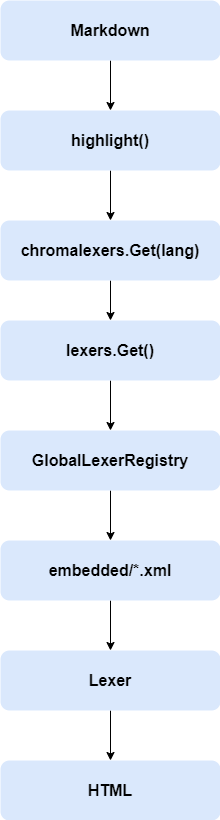
也就是GlobalLexerRegistry中的所有解析器都是从embedded/*.xml文件中拿到的。
图1 流程图
Matlab XML示例
以matlab.xml为例:
 1
 2
 3
 4
 5
 6
 7
 8
 9
10
11
12
13
14
15
16
17
18
19
20
21
22
23
24
25
26
27
28
29
30
31
32
33
34
35
36
37
38
39
40
41
42
43
44
45
46
47
48
49
50
51
52
<lexer>
<config>
<name> Matlab</name>
<alias> matlab</alias>
<filename> *.m</filename>
<mime_type> text/matlab</mime_type>
</config>
<rules>
<state name= "blockcomment" >
<rule pattern= "^\s*%\}" >
<token type= "CommentMultiline" />
<pop depth= "1" />
</rule>
<rule pattern= "^.*\n" >
<token type= "CommentMultiline" />
</rule>
<rule pattern= "." >
<token type= "CommentMultiline" />
</rule>
</state>
<state name= "deffunc" >
<rule pattern= "(\s*)(?:(.+)(\s*)(=)(\s*))?(.+)(\()(.*)(\))(\s*)" >
<bygroups>
<token type= "TextWhitespace" />
<token type= "Text" />
<token type= "TextWhitespace" />
<token type= "Punctuation" />
<token type= "TextWhitespace" />
<token type= "NameFunction" />
<token type= "Punctuation" />
<token type= "Text" />
<token type= "Punctuation" />
<token type= "TextWhitespace" />
</bygroups>
<pop depth= "1" />
</rule>
<rule pattern= "(\s*)([a-zA-Z_]\w*)" >
<bygroups>
<token type= "Text" />
<token type= "NameFunction" />
</bygroups>
<pop depth= "1" />
</rule>
</state>
<state name= "string" >
<rule pattern= "[^\']*\'" >
<token type= "LiteralString" />
<pop depth= "1" />
</rule>
</state>
</rules>
</lexer>
Matlab的Lexer主要由<config>和<rules>两部分组成。其中:
<config>描述语言名称、别名和文件扩展名<rules>定义词法规则,每个<rule>对应一种Token匹配方式。
hdevelop.xml
至此,思路已经比较清晰了。既然所有Lexer都来自embedded/*.xml,那么理论上只要增加一个能够描述HDevelop语法规则的XML文件,并将其注册到chroma中,Hugo就能够识别这种语言。
HDevelop的语法并不复杂,主要需要支持以下几类Token:
注释
关键字
字符串
数字
运算符
变量
HALCON Operator
Tuple Operator
在lexers/embedded中新增hdevelop.xml文件:
 1
 2
 3
 4
 5
 6
 7
 8
 9
10
11
12
13
14
15
16
17
18
19
20
21
22
23
24
25
26
27
28
29
30
31
32
33
34
35
36
37
38
39
40
41
42
43
44
45
46
47
48
49
50
51
52
53
54
55
56
57
58
59
60
61
62
63
64
65
66
67
68
69
70
71
72
73
74
75
76
77
78
79
<lexer>
<config>
<name> HDevelop</name>
<alias> hdev</alias>
<alias> hdevelop</alias>
<alias> halcon</alias>
<filename> *.hdev</filename>
<mime_type> text/x-hdevelop</mime_type>
</config>
<rules>
<state name= "root" >
<!-- comment -->
<rule pattern= "^\s*\*.*$" >
<token type= "Comment" />
</rule>
<!-- keywords -->
<rule pattern= "\b(if|else|elseif|endif|for|endfor|while|endwhile|repeat|until|break|continue|return|try|catch|throw|switch|case|default|endswitch)\b" >
<token type= "Keyword" />
</rule>
<!-- tuple operators -->
<rule pattern= "\b(tuple_[A-Za-z0-9_]+)\b" >
<token type= "NameBuiltin" />
</rule>
<!-- dev operators -->
<rule pattern= "\b(dev_[A-Za-z0-9_]+)\b" >
<token type= "NameBuiltin" />
</rule>
<!-- common HALCON operators -->
<rule pattern= "\b(read_image|write_image|read_region|write_region|threshold|binary_threshold|connection|union1|union2|difference|intersection|select_shape|select_shape_std|area_center|count_obj|gen_rectangle1|gen_rectangle2|gen_circle|reduce_domain|crop_domain|edges_sub_pix|edges_image|find_shape_model|find_scaled_shape_model|find_ncc_model|create_shape_model|create_ncc_model|disp_obj|clear_window|open_window|close_window|set_color|set_draw|set_line_width|disp_message|dev_display|dev_clear_window|dev_open_window|dev_close_window|dev_update_window|dev_set_color|dev_set_draw|dev_set_line_width)\b" >
<token type= "NameBuiltin" />
</rule>
<rule pattern= "\b[a-z][A-Za-z0-9_]*(?=\s*\()" >
<token type= "NameBuiltin" />
</rule>
<!-- constants -->
<rule pattern= "\b(true|false)\b" >
<token type= "NameBuiltinPseudo" />
</rule>
<rule pattern= "\$'[^']*'" >
<token type= "LiteralStringInterpol" />
</rule>
<rule pattern= "\$"[^"]*"" >
<token type= "LiteralStringInterpol" />
</rule>
<!-- strings -->
<rule pattern= "'[^']*'" >
<token type= "LiteralString" />
</rule>
<rule pattern= ""[^"]*"" >
<token type= "LiteralString" />
</rule>
<rule pattern= "\|[^\|\r\n]+\|" >
<token type= "NameBuiltinPseudo" />
</rule>
<!-- float -->
<rule pattern= "\d+\.\d+([eE][+-]?\d+)?" >
<token type= "LiteralNumberFloat" />
</rule>
...
</rules>
</lexer>
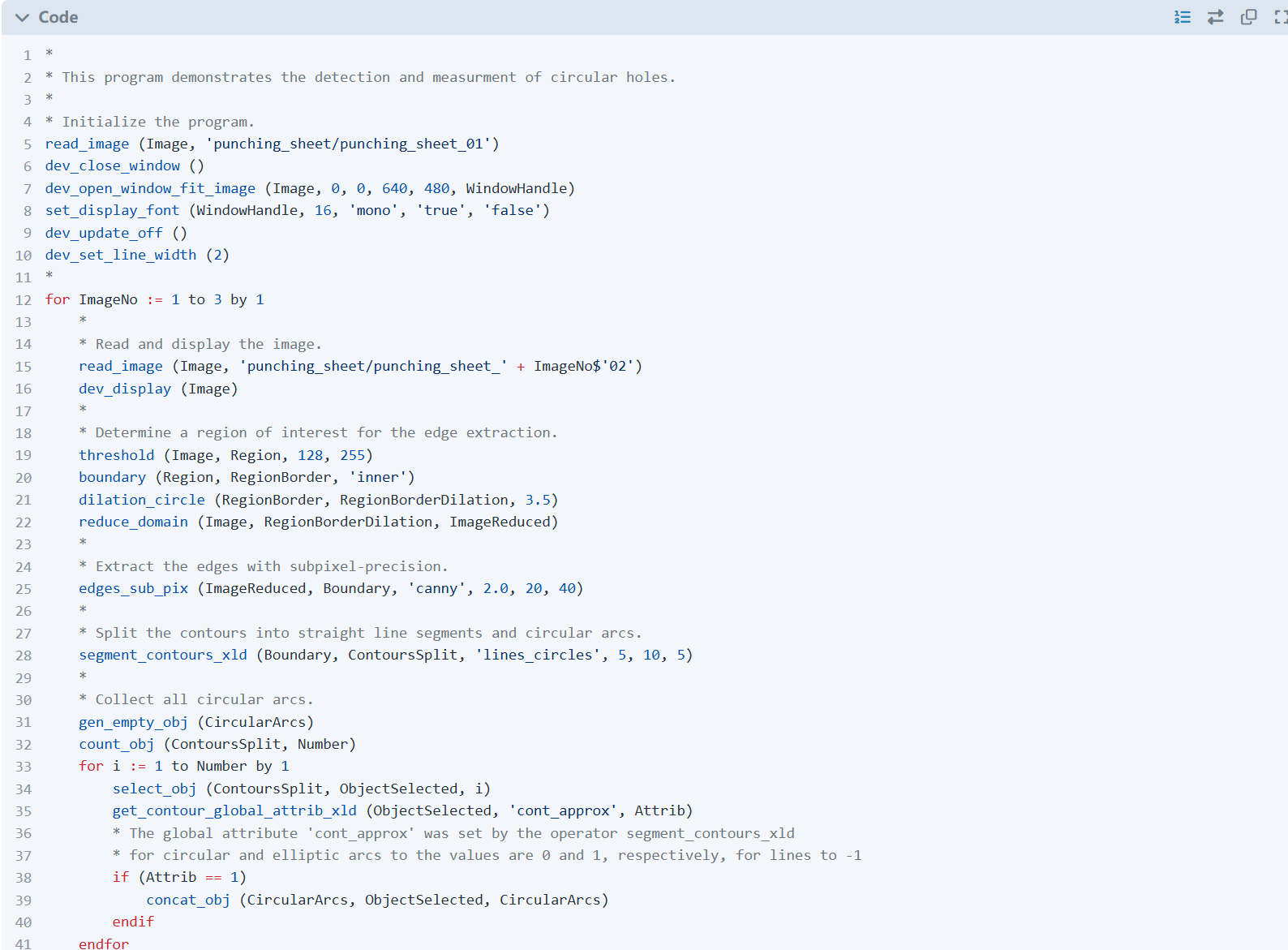
hugo server -D启动Hugo后,效果如下:
图2 Hugo高亮HDevelop效果
当前仍存在的问题
目前已经能够完成 HDevelop 的基本语法高亮,但仍有两个细节需要进一步优化:
代码块必须要写明hdev {name="HDevelop"}否则代码块名称是Code字样而不是HDevelop
注释规则尚未完全兼容,当前行首存在空白字符时无法正确识别注释。
问题1:解决代码块名称显示为Code
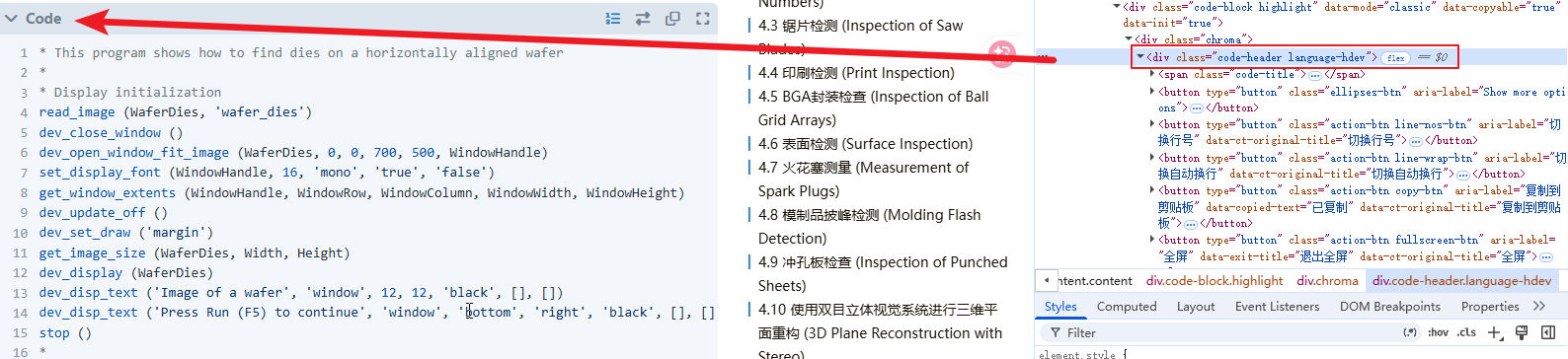
虽然HDevelop已经能够完成语法高亮,但代码块名称仍然显示为Code,而不是HDevelop。首先打开浏览器开发者工具,审查代码块对应的HTML,可以看到外层div包含了一个language-hdev类。
图3 带有language-hdev类的div元素
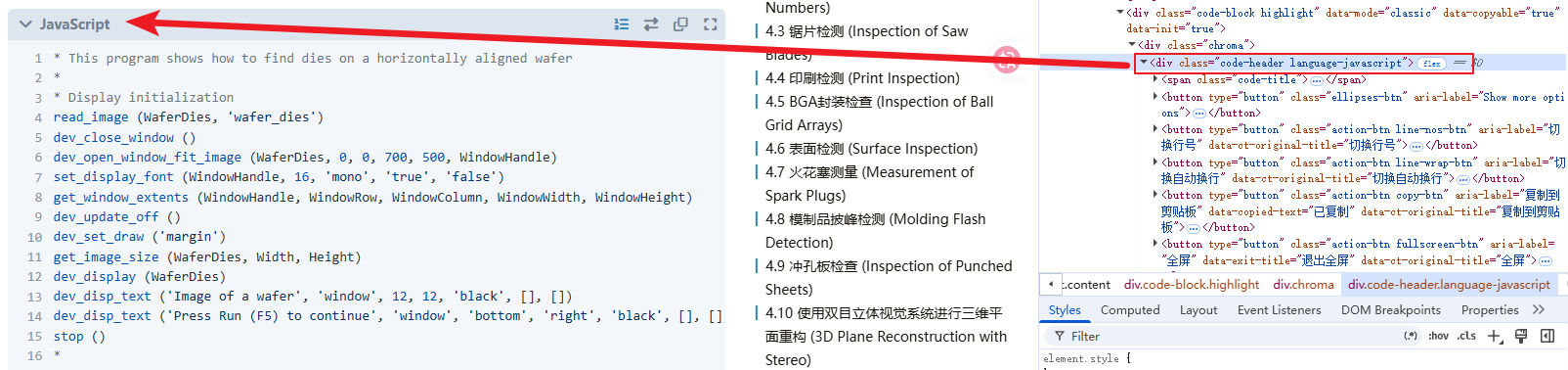
随后尝试将该类名临时修改为language-javascript,页面立即发生了变化,代码块名称由Code变成了JavaScript。
图4 带有language-javascript类的div元素
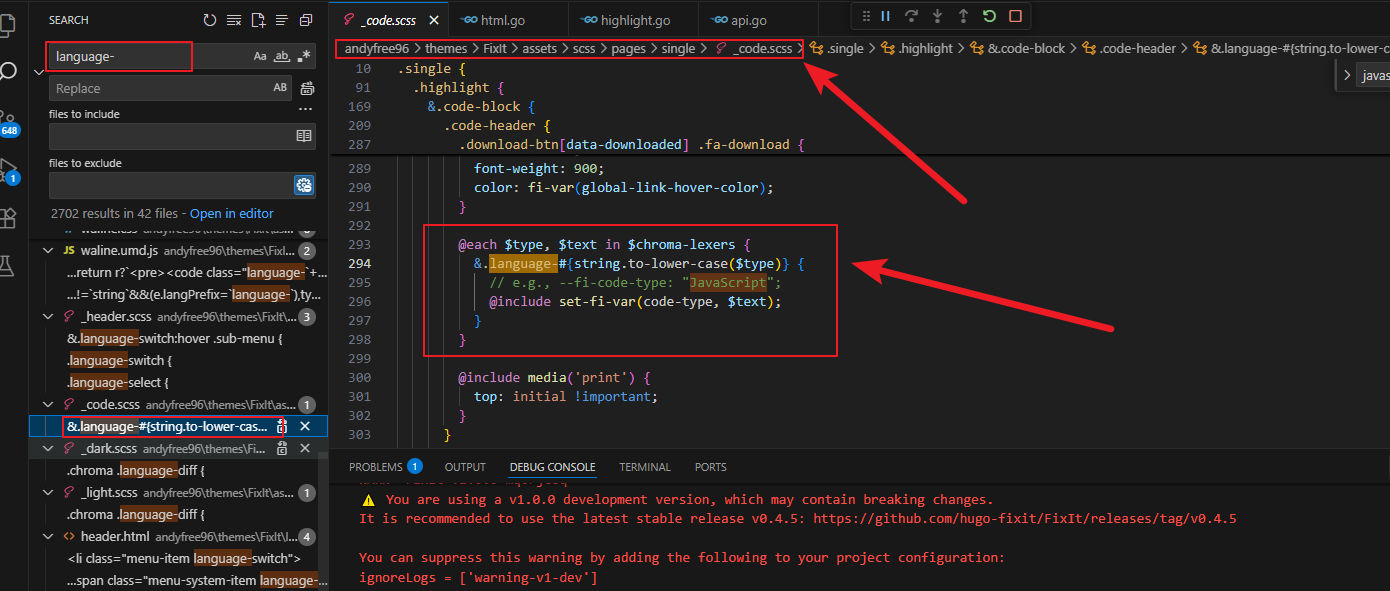
这一现象说明,代码块顶部显示的语言名称并不是 Hugo 在生成 HTML 时直接写入的,而是通过 CSS 根据language-xxx类名动态添加的。因此,虽然我们已经让 Hugo 识别了 hdev 语言,但主题并没有生成对应的language-hdev样式,所以最终只能回退显示默认的Code。既然如此,就需要继续追踪language-xxx这些 CSS 类的生成位置。在 VS Code 中全局搜索language-,很快定位到了_code.scss文件:
图5 _code.scss文件
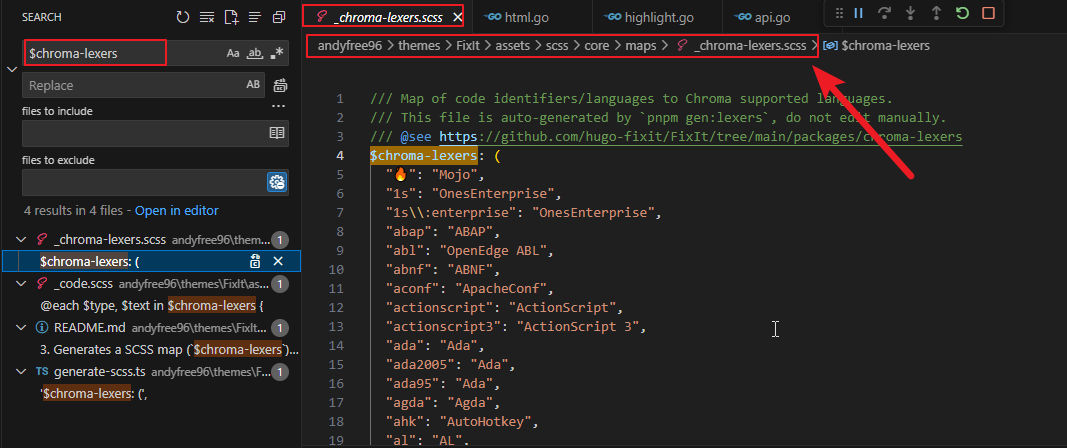
可以看到,language-xxx相关样式都是通过遍历$Chroma-lexers自动生成的,因此继续搜索$Chroma-lexers的定义位置。
图6 _chroma-lexers.scss文件
最终找到了一份语言映射表。虽然文件顶部明确注明不要手动修改(Do not edit manually),但为了验证我们的猜想,还是先在映射表末尾临时追加两项:
1
2
3
4
5
( ...
"yml" : "YAML" ,
"hdev" : "HDevelop" ,
"hdevelop" : "HDevelop"
) ! default ;
重新编译并启动 Hugo 后,代码块标题成功由Code变成了HDevelop。这说明之前的分析是正确的:代码块顶部显示的语言名称并不是 Hugo 根据 Lexer 自动生成的,而是依赖主题维护的一份语言名称映射表。当新增一种语言时,除了实现对应的 Lexer,还需要在这份映射表中补充相应的配置,否则页面无法显示正确的语言名称。
问题2:缩进后的注释无法正确识别
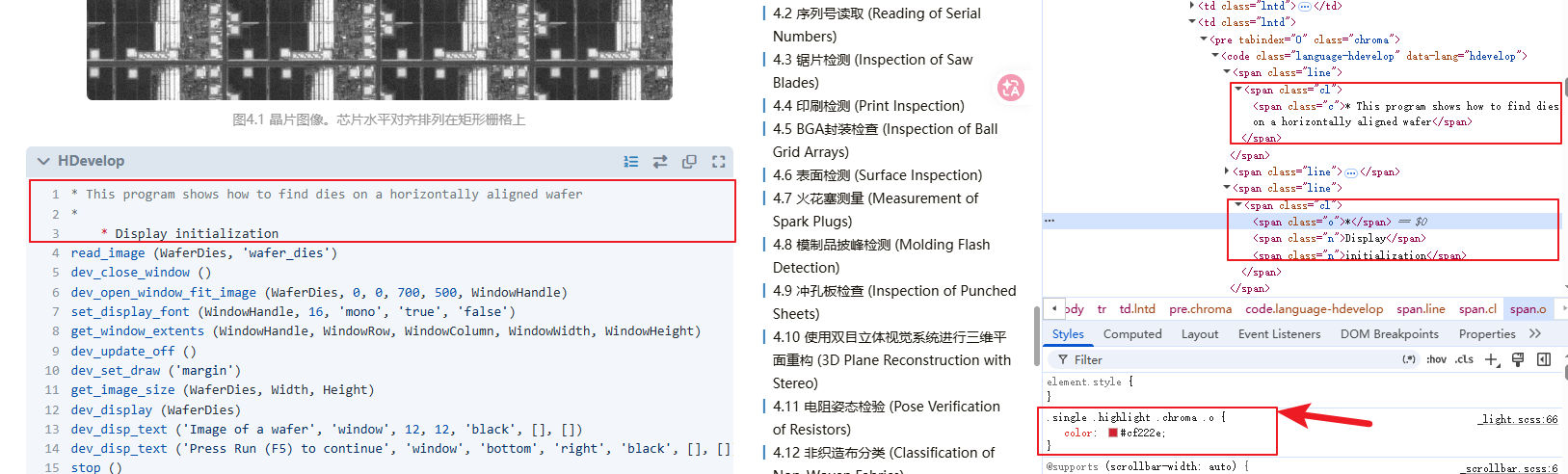
另一个问题出现在注释解析上。如图7所示,当第3行*前增加几个空白字符后,这一行便无法再被识别为注释。
图7 缩进后的注释无法正确识别
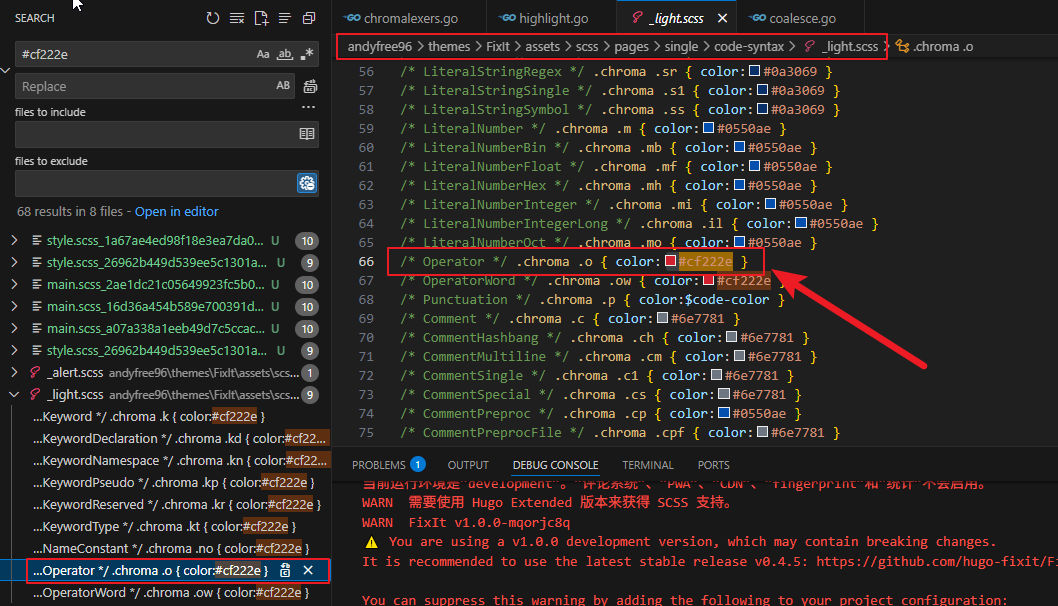
打开浏览器开发者工具查看生成的 HTML(如图7所示),可以发现第一行注释被解析成了一个完整的元素,而第3行却被拆分成了三个不同的 span元素。这说明 Chroma 在词法分析阶段就已经将这一行拆分成了多个 Token,而不是后续渲染阶段出现的问题。继续观察页面样式,可以发现*被渲染成了
图8 .Chroma .o类对应的是Operator
由此可以确定,当前 Lexer 将带有缩进的*识别成了运算符,而不是注释起始符。问题的根源也就十分明确了:hdevelop.xml中关于注释的匹配规则还不够完善。目前使用的是:
1
2
3
<rule pattern= "^\s*\*.*$" >
<token type= "Comment" />
</rule>
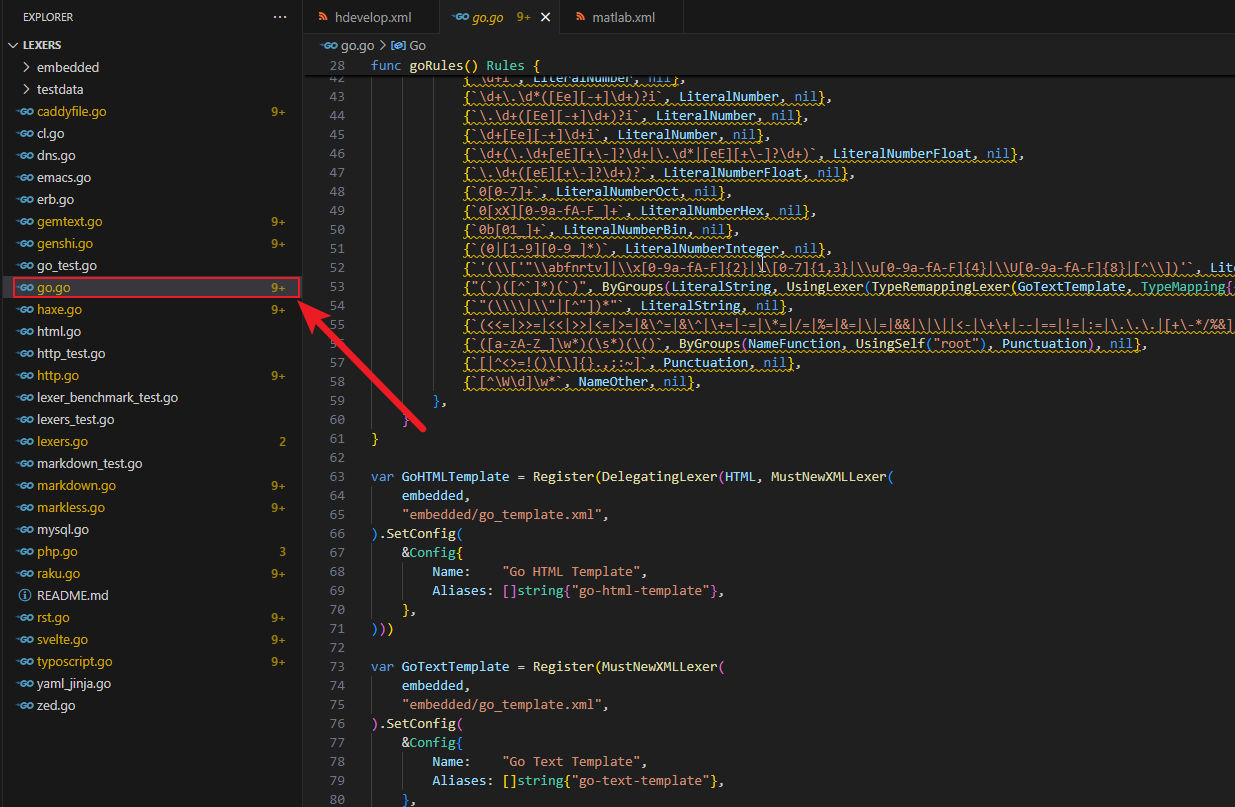
除了使用 XML 描述词法规则之外,Chroma 还支持直接使用 Go 编写 Lexer。
图9 Go编写的Lexer
例如上图中的某些语言,就采用了 Go 实现,而不是 XML 配置。相比 XML,Go Lexer 拥有更强的表达能力,可以处理更复杂的上下文逻辑和状态切换。如果后续发现 HDevelop 的语法难以通过 XML 完整描述,那么直接编写一个 Go 版本的 Lexer,也是一个值得尝试的方向。
总结
本文从 Hugo 不支持 HDevelop 代码高亮这一问题出发,逐步分析了 Hugo 与 Chroma 的源码实现,最终成功实现了 HDevelop 的基本语法高亮支持。
整个过程主要完成了以下几项工作:
通过调试 Hugo 源码,定位到代码高亮的入口highlight();
顺着调用链追踪到chromalexers.Get()和GlobalLexerRegistry,弄清楚了 Chroma 加载 Lexer 的机制;
编写hdevelop.xml,为 HDevelop 定义基本的词法规则,并成功注册到 Chroma;
分析主题源码,补充语言名称映射,使代码块能够正确显示 HDevelop;
借助浏览器开发者工具和源码分析,定位了注释解析存在的问题,并明确了问题根源仍在 Lexer 的词法规则。
虽然目前已经能够满足日常博客中 HDevelop 代码的展示需求,但距离一个完整、成熟的 Lexer 还有一定差距。例如,缩进注释、更多内置算子、复杂字符串以及其他语法细节仍有待进一步完善。另外,在阅读 Chroma 源码的过程中还发现,除了 XML 描述语言规则外,还可以直接使用 Go 编写 Lexer。相比 XML,Go 拥有更高的灵活性和更强的表达能力。如果后续 HDevelop 的语法越来越复杂,或 XML 难以准确描述某些语法特性,尝试实现一个 Go 版本的 Lexer 或许会是更好的选择。
整个折腾过程也让我对 Hugo 的代码高亮机制有了更加深入的理解。从最初的一个"为什么不支持 HDevelop"的问题开始,一路追踪到 Chroma 的 Lexer 注册、词法解析以及主题样式生成,最终不仅解决了实际问题,也顺带熟悉了 Hugo 与 Chroma 的内部实现。对我而言,这比单纯得到一个可用的结果更有价值。
如果后续能够不断完善 HDevelop 的 Lexer,并达到 Chroma 的质量要求,希望尝试向 Chroma 提交 Pull Request。能够让 Hugo、Hexo 等依赖 Chroma 的项目原生支持 HDevelop 语法高亮,也算是这次源码阅读之外的另一份收获。
 AndyFree96 收录于 工程实践
 支付宝
支付宝
 微信
微信